 Final Code
Test your Unity game on iPhone and Android, straight from your Mac
Final Code builds your Unity project for iOS and Android, installs it on the phones on your desk, and shows you every exception the moment it happens.
The Unity Editor's Play mode is a wonderful place to tune a game. It is also a lie about phones. Your Mac has a big GPU, plenty of memory, a mouse and no thermal limits. A mid-range Android phone has none of that. Touch input feels different, frame rates drop, and the notch eats your score counter. The only honest way to know is to test your Unity game on an iPhone and an Android phone, often.
Getting there is the annoying part. A Unity build to Android and iOS normally means switching platforms, waiting for reimports, exporting an Xcode project, opening Xcode, fixing signing, and then doing it all again for the other platform. Final Code takes that whole chain off your hands. It detects the Unity project, builds the iOS and Android exports for you, and puts the result on real phones.
Unity mobile testing on a Mac, the short way
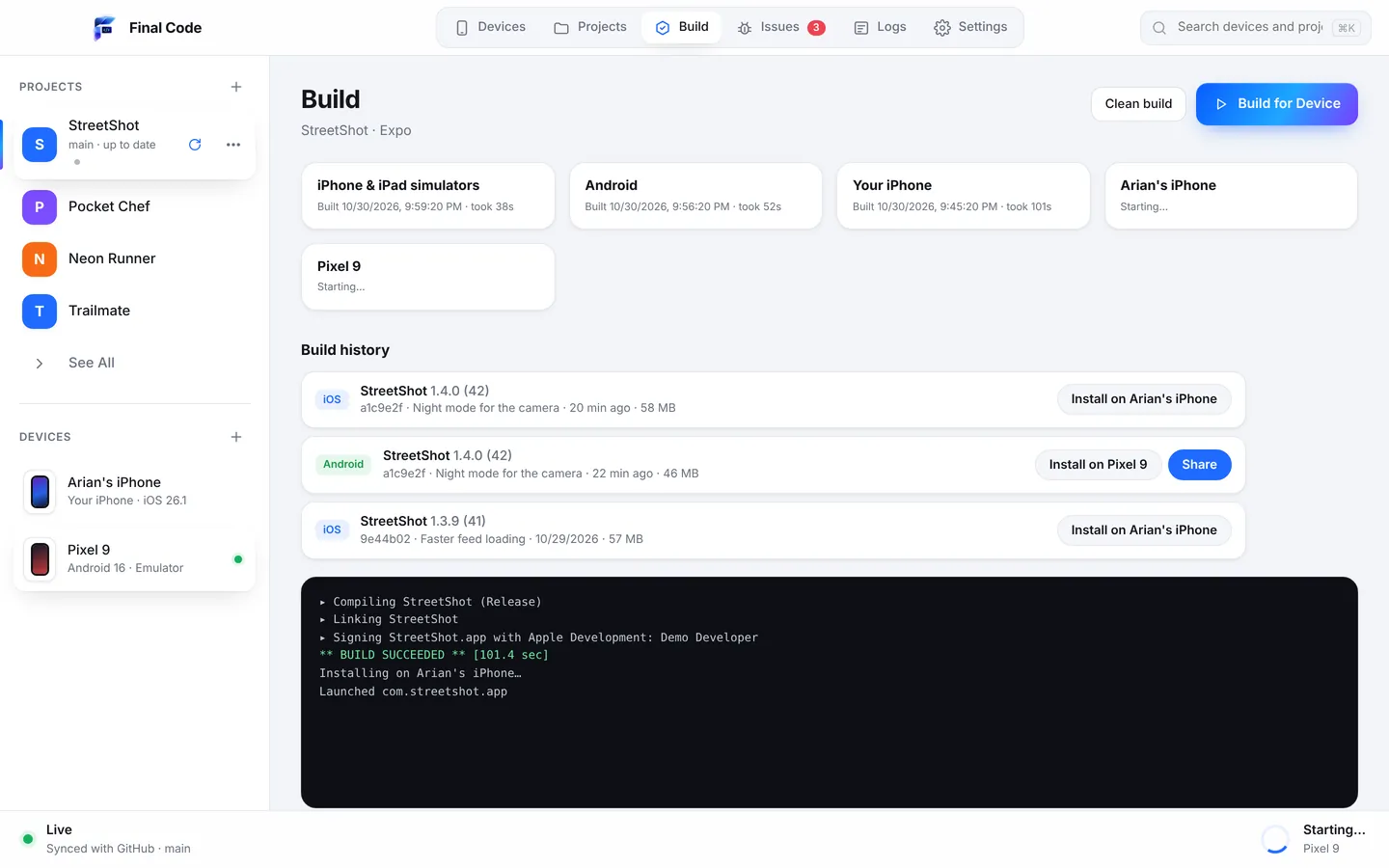
Once your project is open in Final Code, the loop is simple. Change something in your scene or scripts, press Run, and the game lands on every connected phone. The phone log streams back into the same window, with Unity's messages next to native output. When something breaks, you know which phone, which build and which line.
How it works
Open the Unity project
Point Final Code at the project folder or open it from GitHub. It recognises a Unity project automatically. No build scripts to write, no setup files.
Plug in your phones
An iPhone by cable, unlocked and trusted. Android phones by cable with USB debugging, or over Wi-Fi with a pairing code. They appear in the device list by themselves.
Press Run
Final Code builds the iOS and Android exports, signs the iPhone build for you, and installs a release build on each phone. Progress shows with a percentage and time.
Play, watch, fix
Play the game on the real hardware while the log streams in. Exceptions and crashes turn into issues with the stack, the device and what happened just before.
iOS and Android exports, built for you
No manual export, no switching between Unity, Xcode and Android tools for every test. Final Code handles the build chain and installs the game on the phones you picked.
Release builds on real phones
What lands on the phone is a real release build with your game inside, like a TestFlight build but straight from your Mac, in seconds to minutes once the first build is done.
A live phone log
Unity's Debug.Log lines, warnings and errors show next to the phone's own native output, so you can see what the game was doing right before a problem.
Exceptions grouped into issues
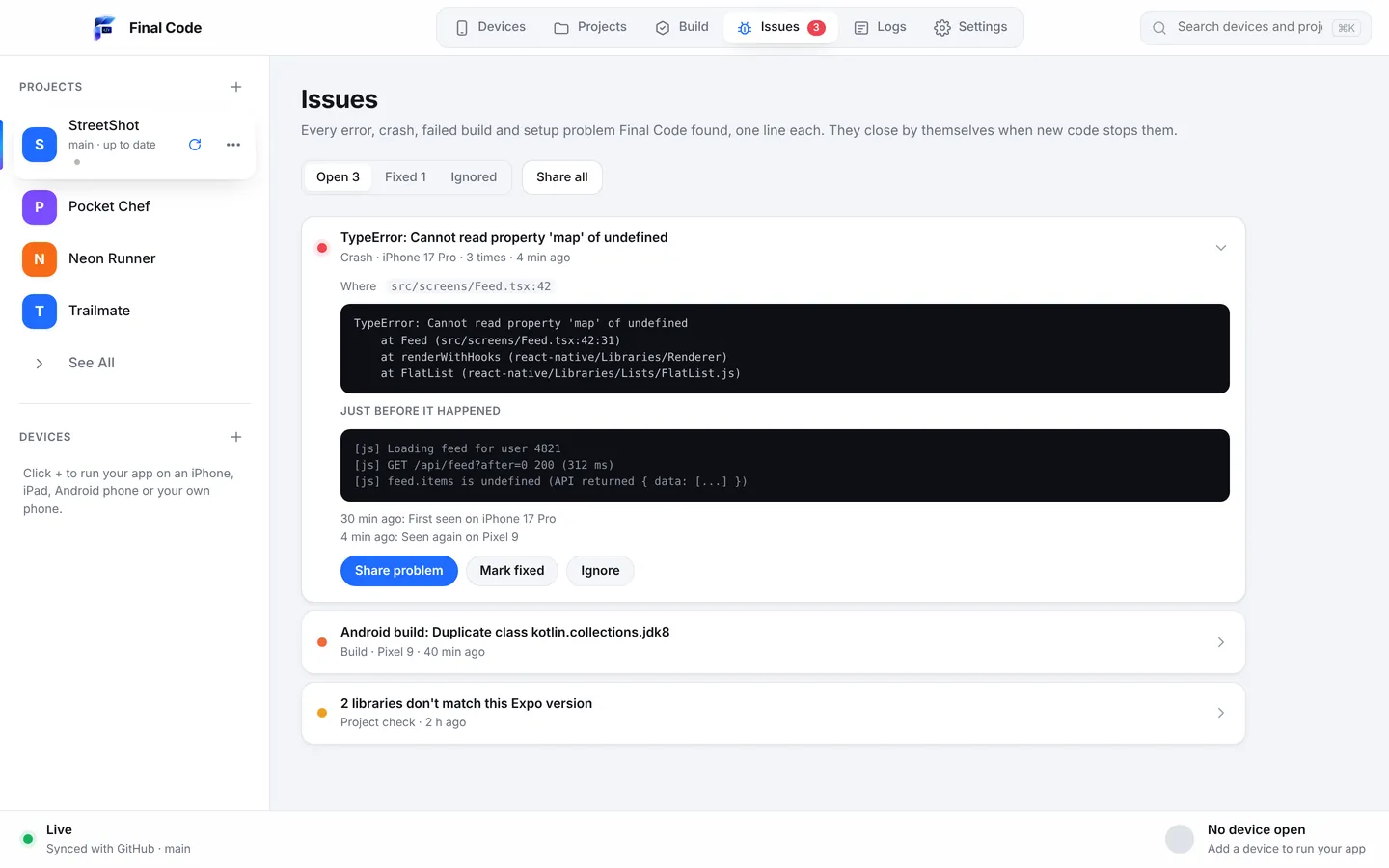
The same NullReferenceException firing every frame becomes one issue with a count, not ten thousand log lines. It closes itself when new code runs three minutes without it.
Every build kept
Each build that reached a phone is stored with its commit, date and size. Reinstall last week's build on any phone in one click to check whether a frame drop is new.
Playtests over Wi-Fi
Hand your Android build to anyone on the same Wi-Fi with a link and QR code. Great for a quick playtest at the studio or a game jam.
Bugs that only show up when the game runs on a phone
Some Unity bugs simply do not exist in the Editor. These are the ones that hurt reviews, because players find them first. Final Code helps you see these problems early, with enough detail to fix them.
Null references from mobile-only code paths
A component that is only added on touch devices, a save file that does not exist yet on a fresh install, a reference that was set in the Editor scene but not in the build. You get a NullReferenceException in a script like Enemy.cs, and in Final Code it arrives as one issue with the stack and the device.
Code stripped from release builds
Mobile builds strip unused code to stay small. Anything your game reaches through reflection or serialization can be removed by mistake, which shows up as a missing method or type at runtime, only on the phone. Since Final Code installs release builds, you see this before you submit.
Pink materials and missing shaders
A shader that the build did not include leaves objects bright pink on device. You will spot it straight away when the game runs on the phone, and the related warnings sit in the phone log.
Crashes with no message at all
When the game just closes on an iPhone, Final Code pulls the crash report from the phone and turns it into a stack with readable function names. Each launch also gets its own phone session log, with the console, native output, build and install steps, and the crash report in one file.
A Mac that is missing something
iPhone builds need Xcode parts, Android builds need the SDK and Java. Final Code's Project check spots missing tools when the project opens, and Settings then Tools installs or fixes each one with a click.
For first-time Unity developers
If you built your first game from a tutorial and now want to see it on your own phone, the mobile build settings can be a wall of jargon: bundle identifiers, provisioning, minimum API levels, signing teams. Final Code is beginner friendly by design. Final Code looks at what is already on your Mac and installs the rest one click at a time. Signing for your iPhone happens automatically with the account already in Xcode or an App Store Connect API key.
When the game crashes, you do not need to read a raw device log. The Issues box explains what went wrong in plain words. Share problem collects the file and line, what changed since the game last worked, the device and the Mac, then "Explain this problem" lets Claude walk you through it. Our step-by-step guide for iPhone and Android testing is a good place to start.
For indie studios and game teams
On a team, one developer often becomes "the build person" who spends half the day making builds for everyone else. Final Code spreads that load. Anyone with the project open can put a build on a phone. Final Code checks GitHub every minute, pulls new commits and reloads, so a test phone on the QA desk keeps up with the main branch while local edits stay safe in a git stash if needed.
The build history doubles as a simple regression tool: install build 12 and build 14 on two phones and compare them. Screenshots and screen recordings of one or all devices make bug reports and store assets easy. Membership covers up to three Macs per person, with every project type included. See pricing.
Games made with AI help
More and more Unity scripts are drafted by AI assistants such as Claude, ChatGPT, Cursor, GitHub Copilot, Gemini or Windsurf. They are fast at writing a MonoBehaviour, but they have never felt your game on a phone. Final Code closes the loop. It writes a .finalcode folder in the project, never committed, with live status, logs, issues, screenshots and the build log.
An AI assistant can read it and ask Final Code to build, run, tap, swipe, take screenshots and read the phone log. So when the assistant says "fixed", it can actually check that the exception is gone on a real device. If the AI pushes to GitHub, Final Code picks up the commit and rebuilds by itself. More on the AI app builders page.
How this fits with Unity's own tools
Unity's Build and Run is built in, free and works well for one platform at a time. Unity Cloud services and Xcode cover cloud builds and signing. TestFlight and Google Play testing tracks are how you hand a finished build to outside players, and they are worth using. Final Code is for the many builds before that: both platforms from one Mac, real phones in one window, logs and grouped exceptions, and a history of every build. Read Final Code vs TestFlight and vs the Xcode Simulator, or all comparisons.
Product names are trademarks of their owners. Comparison based on publicly available information as of October 2026.
Not every game is made in Unity. Final Code also runs three.js and other web games (see web apps and games), and React Native Filament games (see React Native). The full list is on the features page.
How do I test my Unity game on an iPhone?
You need a Mac with Xcode. Open the Unity project in Final Code, connect the iPhone by cable, unlock it and tap Trust, then press Run. Final Code builds the iOS export, signs it with your Apple account or App Store Connect API key and installs a release build on the phone.
Can I build a Unity game to Android and iOS ?
Final Code builds the iOS and Android exports of your Unity project for you and installs them on the phones you choose, all from one Mac app. You see both phones and their logs in one window, instead of switching platforms and tools by hand.
What is the best way to do Unity mobile testing on a Mac?
Test on real phones as early and as often as you can, because performance, touch and screen shapes differ from the Editor. Final Code makes that quick: one click builds and installs release builds, the phone log streams back, and exceptions are grouped into issues with the stack and device.
Why does my Unity game work in the Editor but crash on the phone?
Common reasons are null references from code paths that only run on mobile, code stripped from release builds, missing shaders and memory limits. Final Code shows the crash with a readable stack, the device and the log lines just before it, so you can find the cause.
Can I see Debug.Log output from my phone?
Yes. Final Code streams the phone log live, including your game's log messages and the phone's native output. Each launch on a real phone is also saved as its own session log file.
How do I share a Unity Android build with playtesters?
Anyone on the same Wi-Fi can install your Android build from a link or a QR code shown in Final Code. No store listing or account is needed for that.
Can I go back to an older build of my game?
Yes. Every build that went to a phone is kept with its commit, date and size. Pick one in the build history and install it on any connected device in one click.
How much does Final Code cost for game developers?
There is a free 14-day trial started in the app, with no card needed. After that it is $29 per month or $249 per year, for up to three Macs. Every project type, Unity included, is part of the same membership.
Play your game on a real phone today
Download Final Code, open your Unity project and press Run.