 Final Code
Final Code vs TestFlight
TestFlight is how your testers get the app. Final Code is how you get the app right before they do.
Quick answer
Choose TestFlight if you need to send an iPhone, iPad, Mac, Apple TV, Apple Watch or Vision Pro build to other people: colleagues, clients or thousands of beta testers around the world. It is Apple's official beta service, it is included with Apple Developer Program membership, and testers already trust it.
Choose Final Code if you are the one testing, many times a day, on devices next to you. Final Code puts a release build on your own iPhone straight from your Mac in seconds to minutes, with no upload and no processing wait, and shows Android phones, simulators and emulators in the same window.
The honest answer for most teams: use both. They sit at different points in your week.
A day with TestFlight, and a day with Final Code
Picture a small team fixing a checkout bug on a Thursday.
With only TestFlight, the developer makes a change, archives the app, uploads it to App Store Connect, waits for processing, then opens the TestFlight app on their phone and installs. If the fix is not right, they do it all again. That loop is fine once a day. It is slow ten times a day.
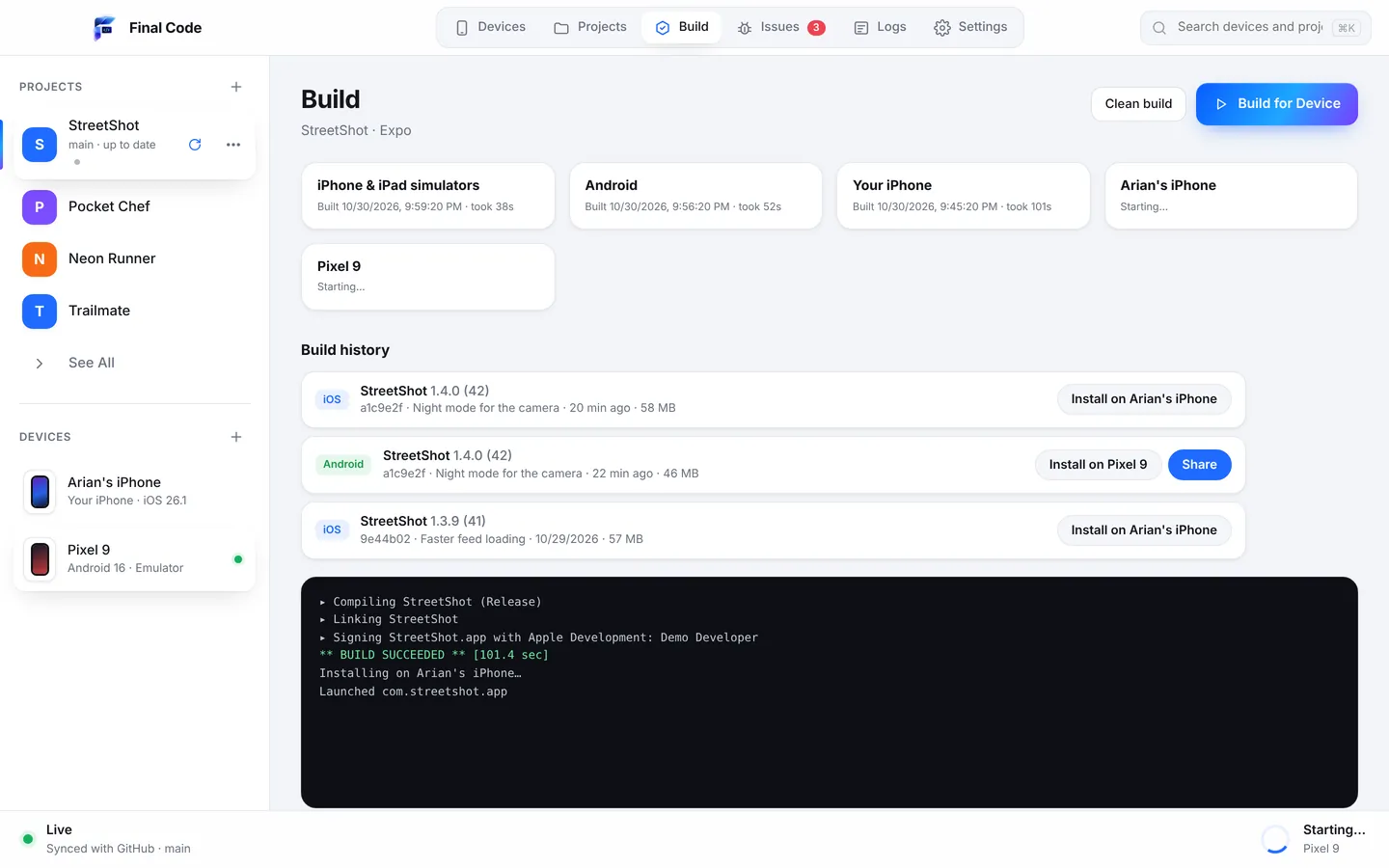
With Final Code, the developer saves the file. Every open iOS Simulator and Android Emulator updates on its own. When they want to try the real thing, they press Run and Final Code installs a release build on the iPhone and the Android phone plugged into the Mac. If something crashes, the Issues box shows the stack and the device right away. Once the fix is solid, they send one build through TestFlight to the client. That is the point of TestFlight: the moment other people need it.
Final Code vs TestFlight compared
| Final Code | TestFlight | |
|---|---|---|
| Main purpose | Your own daily testing | Beta testing with other people |
| Who gets the build | Devices connected to your Mac; Android builds shared on your Wi-Fi by QR code | Up to 100 internal and 10,000 external testers |
| Time from code to phone | Seconds to minutes, straight from your Mac | Upload, then processing |
| Review before installing | None | Beta App Review for the first external build in a group |
| Platforms | iPhone, iPad, Android, simulators, emulators, web shapes | iOS, iPadOS, macOS, tvOS, watchOS, visionOS |
| Android | Yes | No |
| Live reload while you code | On every open simulator and emulator | No |
| Live log from the phone | Session log per launch | No |
| Crashes | Issues box, as they happen | Crash and session metrics in App Store Connect |
| Tester feedback with screenshots | Not a tester tool | Built in |
| How long a build lasts | Kept in build history | Up to 90 days |
| Price | $29/month or $249/year, 14-day free trial | Included with Apple Developer Program (99 USD/year) |
What TestFlight does really well
TestFlight deserves its reputation. According to Apple's App Store Connect documentation at the time of writing:
- You can invite up to 100 internal testers from your App Store Connect team and up to 10,000 external testers by email or a public link.
- Testers on recent versions can send feedback from the TestFlight app or by taking a screenshot inside your beta, and it lands in App Store Connect.
- It works for apps on iOS, iPadOS, macOS, tvOS, watchOS and visionOS.
- Build metrics include sessions and crashes.
For reaching people who are not in the room, nothing in the Apple world is as smooth. Final Code does not try to replace that.
Setup
TestFlight needs an Apple Developer Program membership, an app record in App Store Connect, a signed archive and an upload. If you invite outside testers, the first build you add to a group goes to Beta App Review, and later builds may not need a full review. It is a one-time learning curve, then routine.
Final Code connects to your Apple developer account with an App Store Connect API key or uses the account already in Xcode, and signs apps for your iPhone automatically in every project. Plug the iPhone in by cable, unlock it and tap Trust. That is it. Android phones connect by cable with USB debugging or over Wi-Fi with a pairing code.
Speed
Every TestFlight build goes up to Apple and comes back down. Processing time varies, and if you are waiting to see whether a one-line fix worked, any wait adds up.
Final Code builds on your Mac and installs directly. The first native build of a project takes a few minutes; after that, Final Code only rebuilds native code when native code or libraries change, and reuses the last build otherwise. A compiler cache and a shared download cache keep things quick across projects. On simulators and emulators, saved changes show up instantly.
Real devices vs simulated devices
Here the two tools agree: real devices matter. TestFlight puts a real build on real phones, and so does Final Code. The difference is reach. TestFlight reaches any tester's iPhone anywhere. Final Code reaches the phones on your desk, plus as many simulators and emulators as your Mac can run, all mirrored in one window so you can tap and swipe them with your mouse.
Final Code's inspector also lets you change each device's orientation, appearance, text size, network (Wi-Fi, 5G, offline), GPS location and battery level, which is handy before a build goes to testers who will try all of those for you.
Release builds and development builds
TestFlight only takes builds signed for distribution, the same kind you would send to the App Store. Final Code gives real phones release builds too, with the code inside, so what you test is what users get. On simulators and emulators you keep live reload for fast iteration.
Build history is a quiet favourite. Every build that reaches a phone is kept with its commit, date and size. If a tester reports that something broke "sometime last week", you can put older builds back on a phone in one click and find the exact one. TestFlight builds stay available for up to 90 days.
Debugging and crash reports
TestFlight shows crashes and tester feedback in App Store Connect after the fact, which is perfect for problems found by people you cannot watch over the shoulder.
Final Code is for the problems you can catch first. Every launch on a real phone gets a session log with the app's JavaScript console, the phone's native output, the build and install steps, and crash reports with readable function names. The Issues box groups each problem once, with counts, device, stack and the log lines just before. With version 0.5.0, "Share problem" bundles what happened, the file and line, what changed since it last worked, and the device into one report with passwords, keys and tokens removed. "Explain this problem" has Claude explain it in plain words with steps.
Working with AI coding tools
An AI assistant cannot open TestFlight on your phone. It can work with Final Code. The .finalcode folder in your project holds live status, logs, issues, screenshots and the build log, and the assistant can ask Final Code to build, run, reload, tap, swipe, type and read the phone log. Final Code also notices commits the AI pushes to GitHub and rebuilds. More on our AI app builders page.
Price
TestFlight has no separate charge; it comes with the Apple Developer Program, which Apple lists at 99 USD per membership year at the time of writing. Final Code costs $29 a month or $249 a year after a 14-day free trial with no card needed, on up to 3 Macs. See pricing. You will likely want the Apple membership either way to ship on the App Store.
Privacy
TestFlight builds are uploaded to Apple, as any App Store app is. Final Code keeps your code on your Mac during development and sends nothing about your project anywhere. The membership check only sends your email, plan and a one-way code for the Mac.
Who should use which
- You need feedback from people outside your team: TestFlight.
- You are fixing bugs and want to see each change on a real iPhone now: Final Code.
- You also ship on Android: Final Code for testing both platforms together, plus TestFlight and Google Play's testing tracks or Firebase App Distribution for testers.
- You build native Apple apps in Swift, or cross-platform in React Native or Flutter: both apply equally.
How to use Final Code and TestFlight together
- Work in Final Code all day: simulators and emulators update as you save, real phones get release builds when you press Run.
- Fix what the Issues box and project check find.
- If Final Code patched a library on your Mac, press "Store builds need a fix" so the same fix is added to your project and pushed. Your TestFlight build will then match what you tested.
- Archive and upload to TestFlight for your testers.
- When a tester reports a bug, reproduce it in Final Code with the same commit from build history.
Comparing other beta tools? See Final Code vs Firebase App Distribution, or go back to all comparisons.
Do I still need TestFlight if I use Final Code?
If you want other people to test your iPhone app, yes. TestFlight is Apple's way to send builds to up to 10,000 external testers anywhere, with feedback built in. Final Code is for your own testing on devices connected to your Mac. Many developers use Final Code every day and TestFlight when a build is ready for others.
How can I install my app on my iPhone without TestFlight?
Connect the iPhone to your Mac by cable, unlock it and tap Trust. Final Code signs the app for your phone automatically using your App Store Connect API key or the Apple account in Xcode, builds a release version and installs it in seconds to minutes. No upload to App Store Connect and no processing wait.
Is there a TestFlight for Android?
TestFlight is Apple only. On Android, people commonly use Google Play's testing tracks or Firebase App Distribution to reach testers. For your own testing, Final Code installs release builds on Android phones by cable or Wi-Fi and can share an Android build with anyone on the same Wi-Fi using a link and QR code.
Why is my TestFlight build taking so long?
Every TestFlight build is uploaded to Apple and processed before testers can install it, and the first build for external testers goes through Beta App Review. That is normal. To avoid waiting while you are still fixing things, test locally first: Final Code installs builds directly from your Mac to your phone, then you upload once when the build is ready.
How long do TestFlight builds last?
According to Apple's documentation, testers can use a TestFlight build for up to 90 days, after which it becomes unavailable. Final Code's build history keeps every build that went on a real phone with its commit, date and size, so you can put an older build back on any connected device in one click.
Can I see crash logs from my iPhone without TestFlight?
Yes. When your app runs on an iPhone from Final Code, each launch gets a session log with the JavaScript console, native output and crash reports with readable function names. The Issues box groups each crash with the stack, the device and the log lines just before it, the moment it happens.
Does Final Code send builds to beta testers?
Not in the way TestFlight does. Final Code installs builds on devices connected to your Mac, and can share Android builds with people on the same Wi-Fi by link and QR code. For iPhone testers elsewhere, TestFlight is the right tool, and Final Code helps make sure the build you upload is one you have already tested.
Is Final Code cheaper than TestFlight?
They are not really alternatives on price. TestFlight comes with the Apple Developer Program at 99 USD per year at the time of writing. Final Code is $29 a month or $249 a year after a free 14-day trial. Most iPhone developers have the Apple membership anyway, and add Final Code for faster daily testing on both platforms.
Test it before your testers do
Put release builds on your own iPhone and Android phone in minutes, then send TestFlight a build you trust.
Product names are trademarks of their owners. Comparison based on publicly available information as of October 2026.