 Final Code
How to test an app built with AI on your phone
Your AI wrote the code. Final Code puts it on a real iPhone or Android phone, and turns every error into a report your AI can fix.
You described an app, and an AI built it. Maybe you used Claude or ChatGPT in a chat, Cursor or Windsurf in an editor, GitHub Copilot inside your code, or Gemini. Maybe you started in Lovable or Bolt and exported the project. Now you have a folder full of code, or a GitHub repository, and one big question: how do I test an app built with AI on my phone?
That is the moment many people get stuck. The chat says "run npx expo start" or "open it in Xcode", and suddenly you are reading about certificates, SDKs and USB debugging. Final Code skips all of that. It is a Mac app that opens your project, works out what kind of app it is, and runs it on real phones, simulators and emulators, with no terminal.
This page is for people who build with AI, whether you call it vibe coding, prompting or just "getting it done". It explains what Final Code does for you and how it helps your AI do a better job.
Why AI-written apps are hard to test
AI tools are very good at writing code. They are much worse at knowing whether that code actually works on a phone, because they cannot see one. A few things go wrong again and again:
- The AI never ran the app. It wrote code that looks right, but nobody pressed a button on a real screen.
- Libraries do not match. An AI may suggest a package version that does not fit the Expo or React Native version in your project.
- Release builds behave differently. Some code works while developing but crashes in the build your users download.
- Errors are hard to pass back. You copy half a red screen into the chat, the AI guesses, and the loop repeats.
- Setup is outside the code. A sign-in method switched off in Supabase or Firebase not set up looks like a bug, but no code change will fix it.
Final Code was built with exactly these problems in mind.
Run an AI-generated app on iPhone and Android in one window
Open your project folder or pick the repository from GitHub. Final Code detects the project type by itself: React Native, Expo (including Expo Router), Flutter, native Swift or Kotlin, Capacitor or Ionic, a web app built with React, Next.js, Vite, Vue or Svelte, or a game in Unity, three.js or React Native Filament. If the AI made a monorepo with several apps, Final Code finds each one and lets you switch in a click.
Then pick devices. An iPhone simulator and an Android emulator appear inside the Final Code window, and you can click, swipe and type on them. Plug in your own iPhone with a cable, unlock it and tap Trust, and Final Code signs and installs a real release build on it. Android phones connect by cable with USB debugging or over Wi-Fi with a pairing code. This is how you run an AI generated app on iPhone without learning Xcode.
The first native build takes a few minutes. After that, when the AI changes a file, every open simulator and emulator updates instantly.
No terminal
No commands to copy from the chat. Final Code builds, installs and launches for you.
Mac set up for you
Final Code finds what you already have and installs the rest, from Xcode parts to the Android SDK, one click each.
Real phones, real builds
Phones get release builds with the code inside, so you see what your users will see.
Project check: catching AI mistakes before they crash
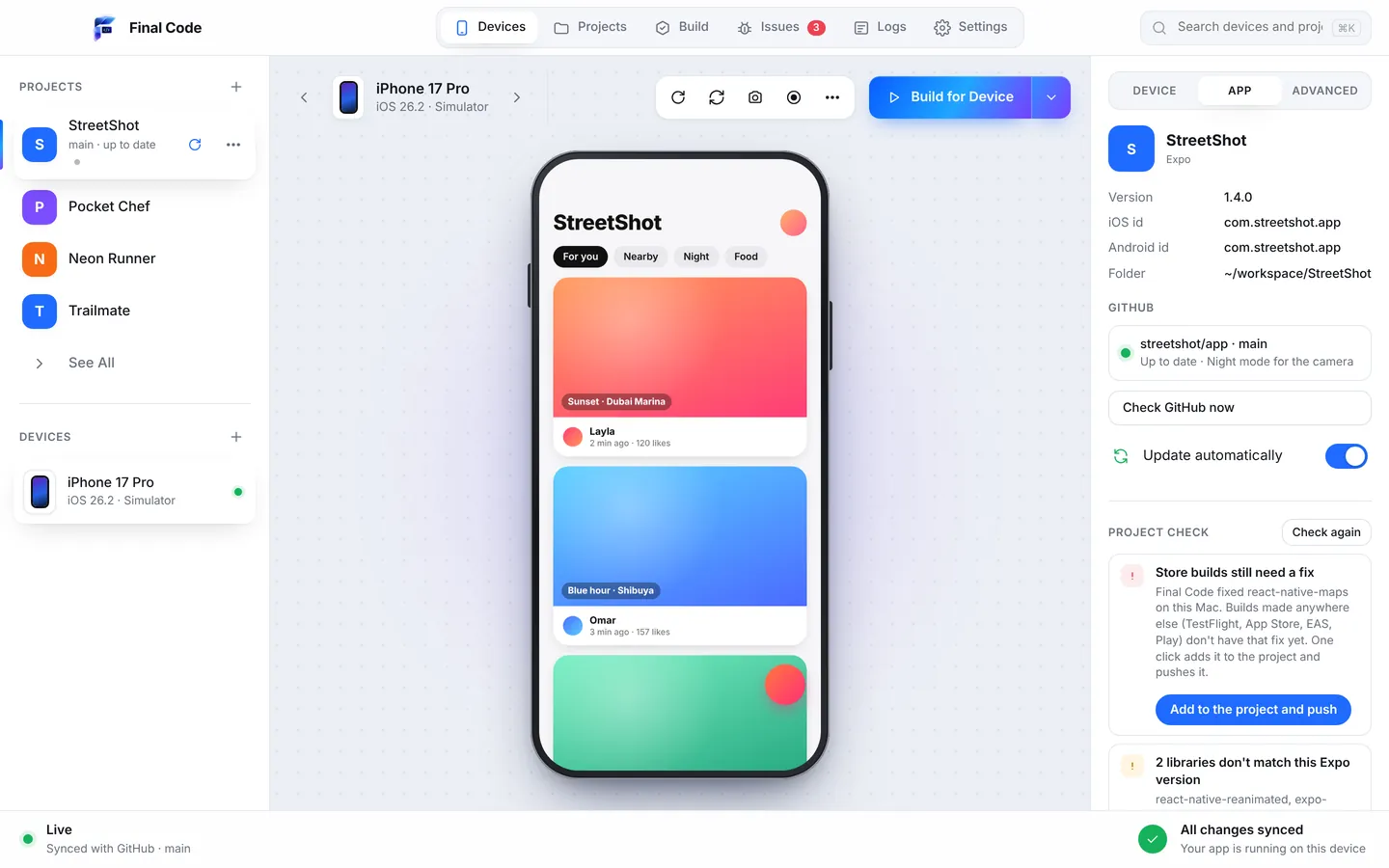
When your project opens, and every time new code arrives, Final Code runs a Project check. It looks for the mistakes AI tools commonly make: libraries that do not match the Expo version, React Native APIs that were removed in the version you have installed (these often crash only in release builds), missing babel plugins, files the app tries to load that do not exist, and worklets that use code declared further down the file. It also checks for missing tools on your Mac.
What is safe to fix, it fixes by itself. The rest gets one button and a plain sentence. If Final Code had to patch a library on your Mac, the "Store builds need a fix" button adds the same fix to your project with patch-package and pushes it, so builds made elsewhere (TestFlight, the App Store, EAS or Google Play) get it too.
Errors your AI can actually fix
The single most useful thing you can give an AI is a clear description of what went wrong. Final Code collects that for you.
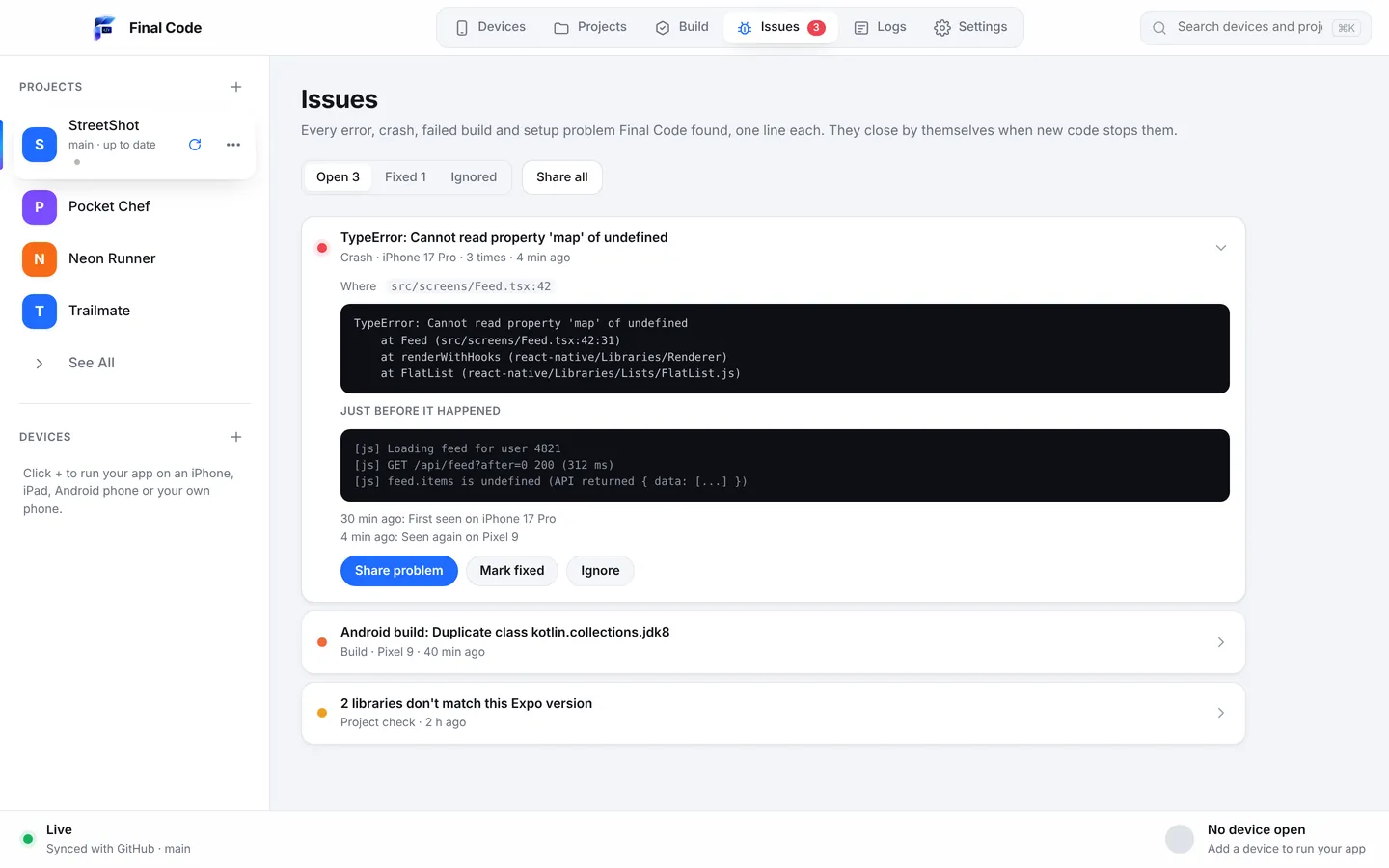
Every error, crash, failed build and setup problem goes into the Issues box as one issue per problem, with how often it happened, on which device, the stack trace and the log lines just before. On real phones there is also a session log for each launch, with the app's JavaScript console, the phone's native output, the build and install steps, and crash reports with readable function names.
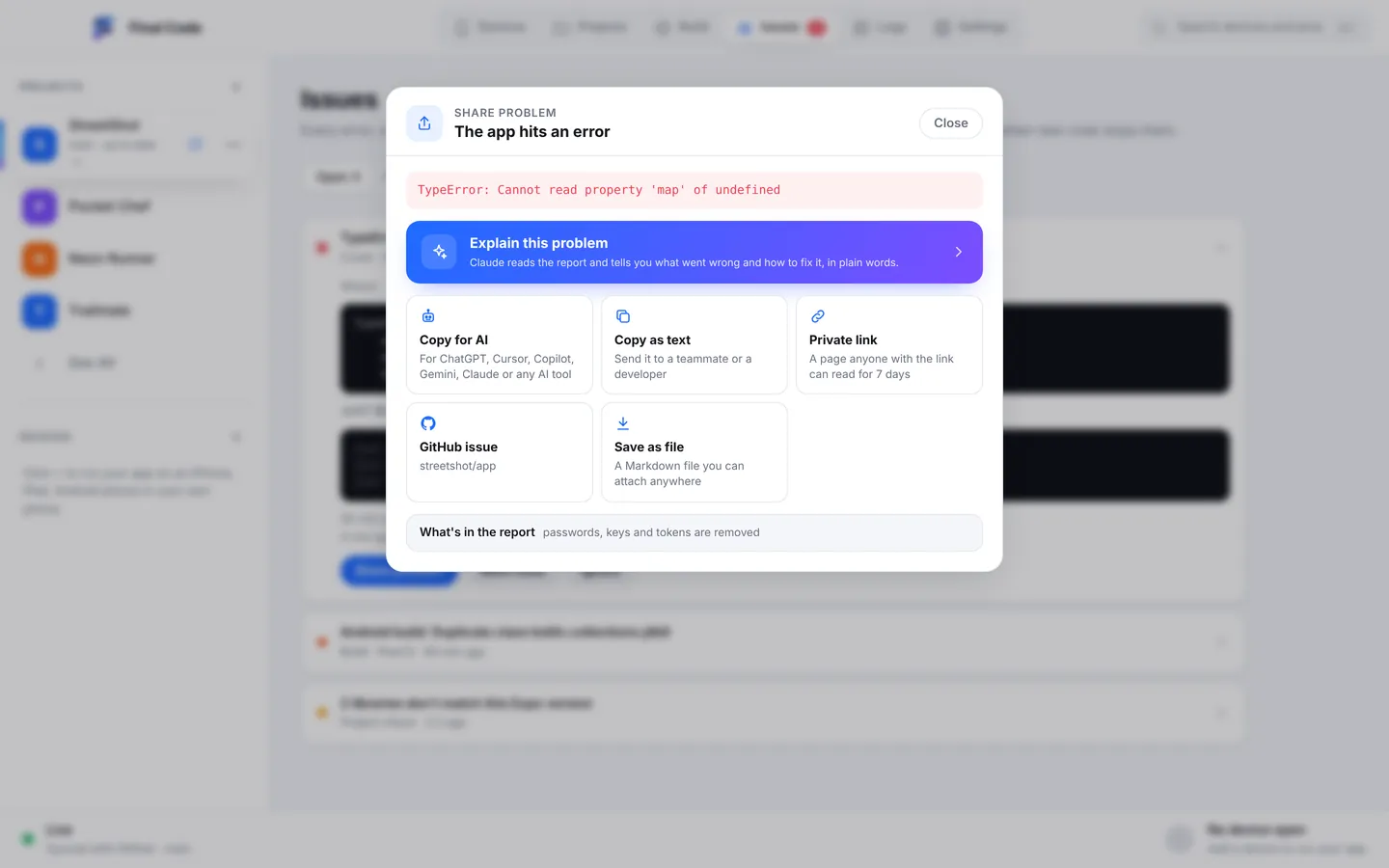
Then, in version 0.5.0, there is Share problem. One press builds a single report with:
- what happened,
- the exact file and line, with the code around it,
- what changed since the app last worked,
- the device and the Mac it happened on.
Passwords, keys and tokens are removed before anything leaves the panel. From there you choose:
- Explain this problem: Claude explains what went wrong in plain words, with steps to fix it.
- Copy for any AI tool: paste it into ChatGPT, Cursor, Copilot, Gemini, Windsurf or whatever you use.
- Copy as text, a private link that lasts 7 days, a GitHub issue, or a file.
Instead of "it is broken, please fix", your AI gets the full picture. That usually means a right answer on the first try, not the fifth.
And when the cause is not in your code at all, Final Code says so. A setup problem, such as a sign-in method switched off in Supabase or Firebase not set up, comes with a link to the right dashboard. That saves you from asking the AI to rewrite code that was never the problem.
The.finalcode bridge: let your AI test its own work
Copying reports is good. Letting the AI look for itself is better. Final Code writes a .finalcode folder inside your project. It holds the live status, logs, issues, screenshots and the build log, and it is never committed to git.
AI coding assistants that work in your project folder can read it. More than that, they can ask Final Code to build, run, reload, tap, swipe, type, take screenshots and read the phone log. In practice that means you can tell your assistant "add a settings screen and check it works on the iPhone", and it can build the change, open the screen on a real device, look at the screenshot and read the log to see if anything went wrong.
This closes the loop that makes AI coding frustrating. The AI is no longer guessing. It checks its own work on real devices, the same way a careful developer would.
Auto-sync from GitHub
Many AI tools work by pushing code to GitHub: a cloud agent, a coding assistant on another machine, or a teammate prompting from their laptop. Final Code checks GitHub every minute. When new commits arrive, it pulls them, rebuilds if native code changed, and every open device reloads.
So the workflow can be as simple as this: ask your AI for a change, let it push, and watch the phones on your desk update a minute later. If you edited something on your Mac in the meantime, your changes are kept or saved to a git stash. They are never lost.
Connecting GitHub takes one click and a short code you approve in your browser. There are no tokens to paste and no command-line tools to install. Use "Open from GitHub" to pick any repository and branch; Final Code picks the newest branch with app code automatically.
Lovable, Bolt and other exported projects
If you started in a browser-based builder and exported or synced the project to GitHub, Final Code treats it like any other project. A web app with a dev server opens in web screen shapes (iPhone, iPad, Android and foldable sizes), so you can check how it looks on a phone. If you wrapped it with Capacitor or turned it into a React Native or Expo app, Final Code runs it on simulators, emulators and real phones.
Vibe coding mobile app testing, step by step
- Download Final Code and drag it to Applications.
- Sign in with your email and a 6-digit code, and start the 14-day free trial in the app. No card needed.
- Install what is missing. It finds what is on your Mac and installs the rest one click at a time.
- Open your project from a folder, or connect GitHub and choose the repository your AI pushes to.
- Pick an iPhone simulator, an Android emulator, and your own phone if it is plugged in. Press Run.
- Use the app. When something breaks, open the issue and press Share problem, then Explain this problem or Copy for any AI tool.
- Let your AI fix it and push. Final Code pulls the change and every device reloads. The issue shows "looks fixed" once the new code runs for 3 minutes without it.
For a deeper walk-through of every way to put an app on a phone, read our guide on how to test your app on iPhone and Android.
Private by design
Your code never leaves your Mac. Final Code has no analytics. Share problem strips secrets before you send anything, and you decide where every report goes. The only thing the app sends online for membership is your email, your plan and a one-way code for the Mac.
Who this is for
People who have never shipped an app and want to see their idea on a real phone tonight. Designers and founders who prototype with AI. Developers who use Copilot or Cursor all day and want their assistant to check its own work. Agencies that review AI-assisted code from several projects. If you build apps with AI and own a Mac, Final Code is the shortest path from "the AI says it is done" to "it works on my phone".
See every capability on the features page, check pricing, or ask us anything in support.
How do I test an app built with AI on my phone?
On a Mac, download Final Code, sign in and open the project folder or GitHub repository your AI created. Final Code detects the project type, then builds and installs it on an iPhone connected by cable or an Android phone connected by cable or Wi-Fi. Simulators and emulators run inside the same window. You do not need to type any commands.
Can I run an AI generated app on my iPhone without knowing Xcode?
Yes. Final Code uses the tools Xcode installs, but you do not have to work in Xcode yourself. Connect your iPhone by cable, unlock it and tap Trust. Add an App Store Connect API key or use the account already in Xcode, and Final Code signs the app for your phone automatically and installs a real release build.
Which AI coding tools work with Final Code?
Any of them. Final Code works with the code, not the tool, so projects written with Claude, ChatGPT, Cursor, GitHub Copilot, Gemini, Windsurf or exported from builders all run the same way. Copy for any AI tool gives you a report to paste anywhere, and assistants that work in your project folder can use the .finalcode folder to build, run and read logs.
What is the.finalcode folder?
It is a folder Final Code writes inside your project with live status, logs, issues, screenshots and the build log. It is never committed to git. AI assistants can read it and ask Final Code to build, run, reload, tap, swipe, type, take screenshots and read the phone log, so they can test their own changes on real devices.
How do I give my AI the error so it can fix it?
Open the issue in Final Code and press Share problem. It makes one report with what happened, the file and line with the code around it, what changed since the app last worked, and the device. Secrets are removed. Choose Copy for any AI tool and paste it into your chat, or press Explain this problem to have Claude explain it in plain words.
Does Final Code update the phone when my AI pushes to GitHub?
Yes. Final Code checks GitHub every minute. When new commits arrive, it pulls them and every open device reloads. Native rebuilds only happen when native code or libraries changed. If you edited files on your Mac, those edits are kept or saved to a git stash, so they are never lost.
Is vibe coding mobile app testing possible without a developer account?
Simulators and emulators need no developer account at all, so you can test on them straight away. To put the app on your own iPhone, Final Code signs it using an App Store Connect API key or the Apple account already in Xcode. Android phones need no account; just turn on USB debugging or Wi-Fi pairing.
Can I test a Lovable or Bolt app on my phone?
If you export or sync the project to GitHub or your Mac, yes. A web app with a dev server opens in iPhone, iPad, Android and foldable screen shapes. If the project is wrapped with Capacitor or Ionic, or built as React Native or Expo, Final Code runs it on simulators, emulators and real phones like any other project.
Will my code be sent to an AI or the cloud?
No. Your code never leaves your Mac and the app has no analytics. Nothing is sent to an AI unless you choose to: Explain this problem sends that one report to Claude, and Copy for any AI tool only copies text for you to paste. Passwords, keys and tokens are removed from reports first.
See what your AI built, on a real phone.
Download Final Code, open your project and press Run. Free for 14 days, no card needed.