 Final Code
Final Code vs the alternatives
An honest guide to the app testing tools people use every day, what each one is best at, and where Final Code fits in.
If you build apps, you already know the question: how do I see my app working on a real phone, quickly, without losing an afternoon to setup? There are many good answers. Expo Go, TestFlight, Xcode with its Simulator, Android Studio with its emulator, BrowserStack App Live, Appetize.io and Firebase App Distribution are all solid tools made by capable teams. Each solves a slightly different problem.
This page compares Final Code with all of them. We will tell you when another tool is the better choice, because that is useful to you and because many of these tools work best together. Each comparison below links to a full page with more detail, examples and answers to common questions.
The short version
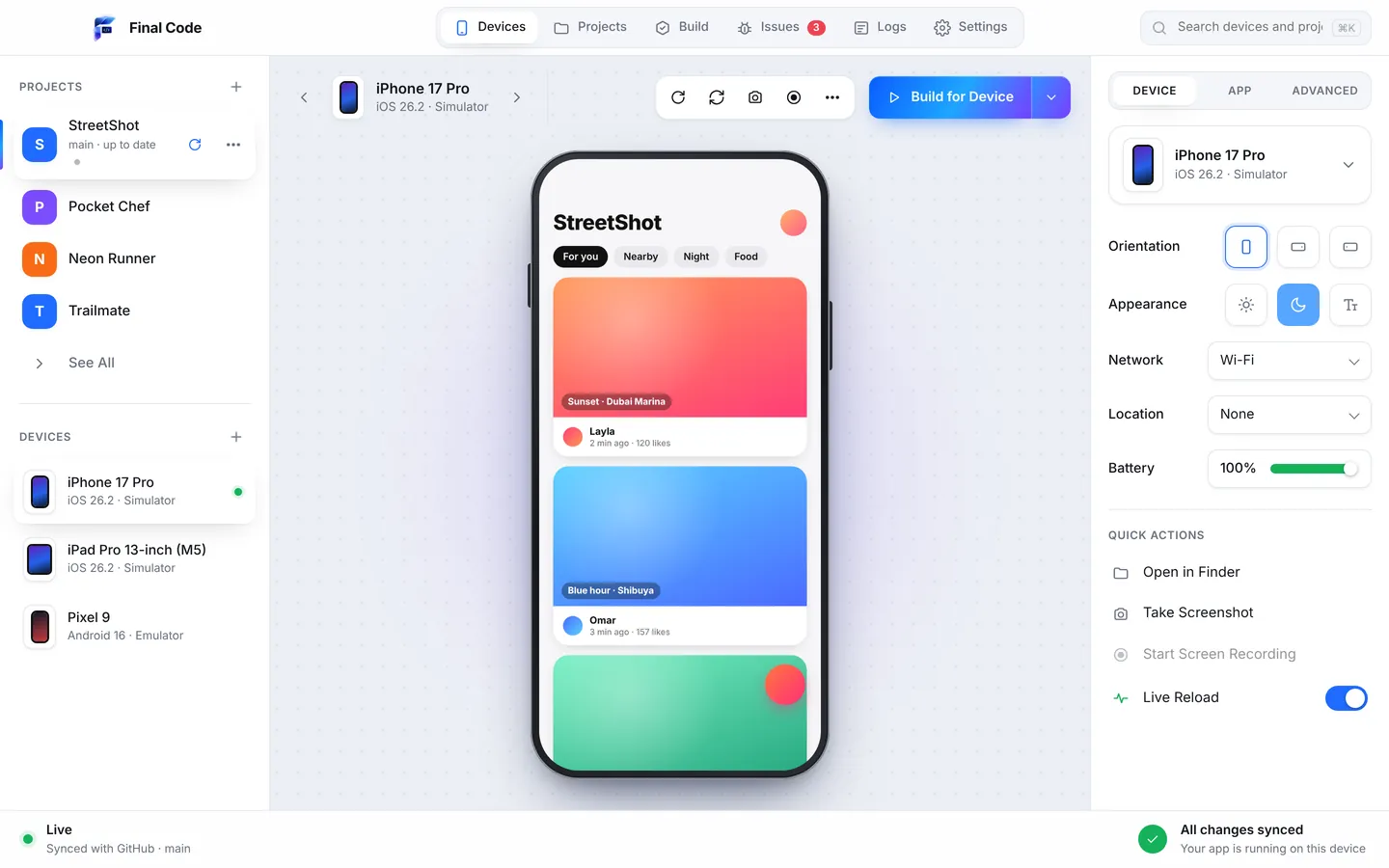
Final Code is a Mac app that builds, runs and tests any app or game on real iPhones, iPads and Android phones, iOS Simulators, Android Emulators and web screen shapes in one window. It reads your project, works out how to build it, and keeps every connected device up to date as you save code or push to GitHub. Your code stays on your Mac.
The tools it is most often compared with fall into three groups:
- Quick previews on your own phone: Expo Go.
- Official developer tools from Apple and Google: Xcode with the iOS Simulator, and Android Studio with the Android Emulator.
- Sharing builds with other people: TestFlight and Firebase App Distribution.
- Devices in the cloud: BrowserStack App Live (real phones in a data centre) and Appetize.io (simulators and emulators streamed to your browser).
Final Code sits between the first two groups and the last two. It is the place you test on your own devices all day, many times an hour, before a build is ready to share or to send to a cloud device farm.
| Final Code | Expo Go | TestFlight | Xcode + Simulator | Android Studio + Emulator | BrowserStack App Live | Appetize.io | Firebase App Distribution | |
|---|---|---|---|---|---|---|---|---|
| Main job | Build, run and test on your own devices | Preview Expo projects | Beta testing on Apple platforms | Write, build and debug Apple apps | Write, build and debug Android apps | Manual testing on cloud real devices | Run apps in a browser | Send test builds to testers |
| Where it runs | Mac app | Phone app | App Store Connect plus tester app | Mac | Windows, Mac, Linux, ChromeOS | Web browser | Web browser | Web console plus tester flow |
| iPhone and Android in one place | Yes, in one window | Yes, one phone at a time | Apple only | Apple only | Android only | Yes | Yes | Yes |
| Your own real phones | Yes, by cable or Wi-Fi (Android) | Yes | Yes | Yes | Yes | Cloud phones | No | Testers' phones |
| Simulators and emulators | Both, mirrored in one window | No | No | iOS Simulator | Android Emulator | Real devices only | In the cloud | No |
| Custom native code | Yes | Only what Expo Go includes | Yes | Yes | Yes | Yes | Yes | Yes |
| Live updates as you save | Every open simulator and emulator | Yes | New upload each time | Rebuild and run | Apply Changes, rebuild | Upload a new build | Upload a new build | Upload a new build |
| Many project types | React Native, Expo, Flutter, native, Unity, web | Expo projects | Any Apple build | Apple projects | Android projects | Any app binary | Any app binary | Any app binary |
| Crash and log view | Issues box and phone session logs | Dev tools in Metro | Crashes and feedback in App Store Connect | Full debugger | Full debugger | Device and app logs | Debug logs and network | Pairs with Crashlytics |
| Code leaves your computer | Never | Served from your computer | Build uploaded to Apple | No | No | App uploaded to cloud | App uploaded to cloud | Build uploaded to Google |
| Price at the time of writing | $29/month or $249/year, 14-day free trial | Free | With Apple Developer Program, 99 USD/year | Free | Free | Paid plans | Free tier, then paid plans | No cost |
| Best for | Daily testing on many devices | Learning and quick prototypes | Beta testers on iPhone | Deep Apple debugging | Deep Android debugging | Devices you do not own | Demos and browser previews | Testers on both platforms |
Product details come from each company's public docs and pricing pages in October 2026. Follow the links below for the full comparison and sources.
Who each alternative to Final Code is best for
Every tool on this list is good at something. Here is the plain answer to "which should I use?", one tool at a time.
Expo Go
Best for learning React Native and trying an idea in minutes. It is free, needs no Apple account and runs your Expo project from a QR code. Outgrow it when you add native libraries. Final Code vs Expo Go
TestFlight
Best for handing iPhone builds to beta testers, up to 10,000 of them, with feedback and screenshots built in. It is how most iOS betas run. Final Code vs TestFlight
Xcode and the Simulator
Best for writing Swift, stepping through code with breakpoints and profiling. Apple's own tool, free, and essential for native iOS work. Final Code vs Xcode
Android Studio
Best for writing Kotlin, inspecting layouts and profiling Android apps. Its emulator is fast and flexible and runs on Windows, Mac and Linux. Final Code vs Android Studio
BrowserStack App Live
Best when you need a specific phone you do not own, or many models and OS versions, from a browser. A large cloud of real devices. Final Code vs BrowserStack
Appetize.io
Best for showing an app in a web page: sales demos, support training, embedded previews and browser-based automation. Final Code vs Appetize.io
Firebase App Distribution
Best for sending builds to testers on iPhone and Android from one free console, especially if you already use Firebase. Final Code vs Firebase App Distribution
Final Code
Best for the many test runs you do yourself every day: one window, every device, real release builds on real phones, and problems explained in plain words. See all features
How Final Code is different
Most of the tools above are excellent at one step. Final Code tries to make the whole loop of "change code, see it on every device, find what broke" feel like one step. A few things set it apart.
Every device in one window
Simulators and emulators are mirrored live inside Final Code. You click and swipe to touch them, type with your keyboard, rotate them and press home or back. Real iPhones and Android phones sit in the same list. You switch between devices in one click, and each one keeps running.
Any project, detected for you
Open a folder or a GitHub repository and Final Code works out what it is: React Native, Expo, Flutter, native iOS in Swift, native Android in Kotlin, Capacitor and Ionic, web apps, and games made with Unity, three.js or React Native Filament. Monorepos with several apps are detected too, and you switch between them in one click.
Real release builds on real phones
Real phones get real release builds with the code inside, sent straight from your Mac in seconds to minutes. That means what you test is what your users get, including the bugs that only appear in release builds.
Problems found and explained
Project check runs when a project opens and whenever new code arrives. It spots missing tools, libraries that do not match your Expo version, removed React Native APIs and missing files, fixes what is safe, and tells you about the rest in plain words. Errors, crashes and failed builds become one tidy entry each in the Issues box, with the stack, the device and the log lines just before.
Built for AI coding tools
If you build with Claude, ChatGPT, Cursor, GitHub Copilot, Gemini or Windsurf, Final Code gives your assistant a way to check its own work. It writes a .finalcode folder with live status, logs, issues and screenshots, and the assistant can ask Final Code to build, run, reload, tap, type and take screenshots on real devices. More on that on our AI app builders page.
Using Final Code with the other tools
You do not have to pick one. A common, sensible setup looks like this:
- Write code in your editor, or with an AI assistant, and keep Xcode and Android Studio installed for deep debugging and profiling.
- Test every change in Final Code on your own phones, simulators and emulators.
- When a build is ready, send it to people with TestFlight for iPhone or Firebase App Distribution for both platforms.
- Before a big release, check odd devices you do not own on BrowserStack.
- Show the app to clients or customers in a browser with Appetize.io.
Final Code's "Store builds need a fix" button helps here: when it patches a library on your Mac, one click adds the same fix to your project so your TestFlight, App Store, EAS and Play builds get it as well.
What about price and privacy?
Final Code costs $29 a month or $249 a year, with a free 14-day trial started right in the app and no card needed. One membership covers up to 3 Macs. See pricing for the details. Several alternatives are free, and we say so on each page, because a free tool that fits your needs is a good deal.
On privacy, Final Code builds everything on your own Mac. Your code never leaves it, and there are no analytics in the app. Cloud tools work differently by design: you upload a build so it can run on their machines. That is not a flaw, just a different trade-off worth knowing.
Which comparison should you read?
Pick the tool you use today:
- Final Code vs Expo Go: when your Expo project outgrows the sandbox.
- Final Code vs TestFlight: daily testing versus beta distribution.
- Final Code vs Xcode and the iOS Simulator: one window for every device versus Apple's full IDE.
- Final Code vs Android Studio and the Emulator: testing both platforms without switching tools.
- Final Code vs BrowserStack App Live: your own devices versus cloud devices.
- Final Code vs Appetize.io: local testing versus apps streamed to a browser.
- Final Code vs Firebase App Distribution: your own test runs versus builds for testers.
What is the best alternative to Expo Go for apps with native code?
Expo itself recommends a development build once your app needs native libraries that Expo Go does not include. Final Code is a Mac app that builds and runs those projects for you on simulators, emulators and real phones, with no terminal needed. Real phones get release builds, so you test what users will get. Expo Go stays great for learning and quick prototypes.
Is Final Code a replacement for TestFlight?
No, they do different jobs. TestFlight sends iPhone builds to beta testers anywhere, up to 10,000 external testers. Final Code is for your own testing on devices connected to your Mac, many times a day, with live updates, logs and crash details. Most teams use Final Code while building and TestFlight when a build is ready for other people.
Can I test iPhone and Android apps from one Mac?
Yes. Final Code shows iOS Simulators, Android Emulators, real iPhones and real Android phones in one window. Saved code changes appear on every open simulator and emulator, and real phones get release builds straight from your Mac. Xcode and Android Studio each cover one platform, so you would otherwise switch between two tools.
Do I still need Xcode and Android Studio if I use Final Code?
You still need Xcode installed to build iPhone apps on a Mac, and Final Code's Tools screen can install missing parts in one click. You may also keep Xcode and Android Studio open for breakpoints and profiling. Final Code takes over the daily build, run and test loop across both platforms so you are not juggling two IDEs.
Is a cloud device farm better than testing on my own phones?
It depends on what you need. Cloud services like BrowserStack give you devices you do not own, which is ideal for checking rare models. Your own phones are faster for everyday changes, cost nothing per minute, and keep your code on your machine. Many teams test daily on their own devices with Final Code and use a cloud farm before big releases.
Which app testing tool is best for beginners?
For a first React Native experiment, Expo Go is the gentlest start: install it, scan a QR code, done. When you want to run any kind of project, on several devices, without learning terminal commands, Final Code is designed to be beginner friendly: it detects the project, installs missing tools in one click, and explains problems in plain words.
Does Final Code work on Windows?
No. Final Code is a Mac app for macOS 13 Ventura or later, on Apple silicon and Intel. It does not run on Windows, Linux, iPad or phones. The phones are the devices you test on, connected to your Mac. If you work on Windows, Android Studio and cloud services such as BrowserStack or Appetize.io are options to consider.
Which tool should I use to test an app built with AI?
If an AI assistant writes your code, you want a tool it can use too. Final Code writes a.finalcode folder with status, logs, issues and screenshots, and the assistant can ask it to build, run, tap, type and take screenshots on real devices. It also picks up code the AI pushes to GitHub and rebuilds by itself.
See every device in one window
Download Final Code, start the free 14-day trial and run your project on real phones and simulators today.
Product names are trademarks of their owners. Comparison based on publicly available information as of October 2026.