 Final Code
Run your SwiftUI app on iPhone without the Xcode hassle
Final Code builds your Swift, SwiftUI or Objective-C project, signs it for your iPhone, and shows simulators and real devices in one window.
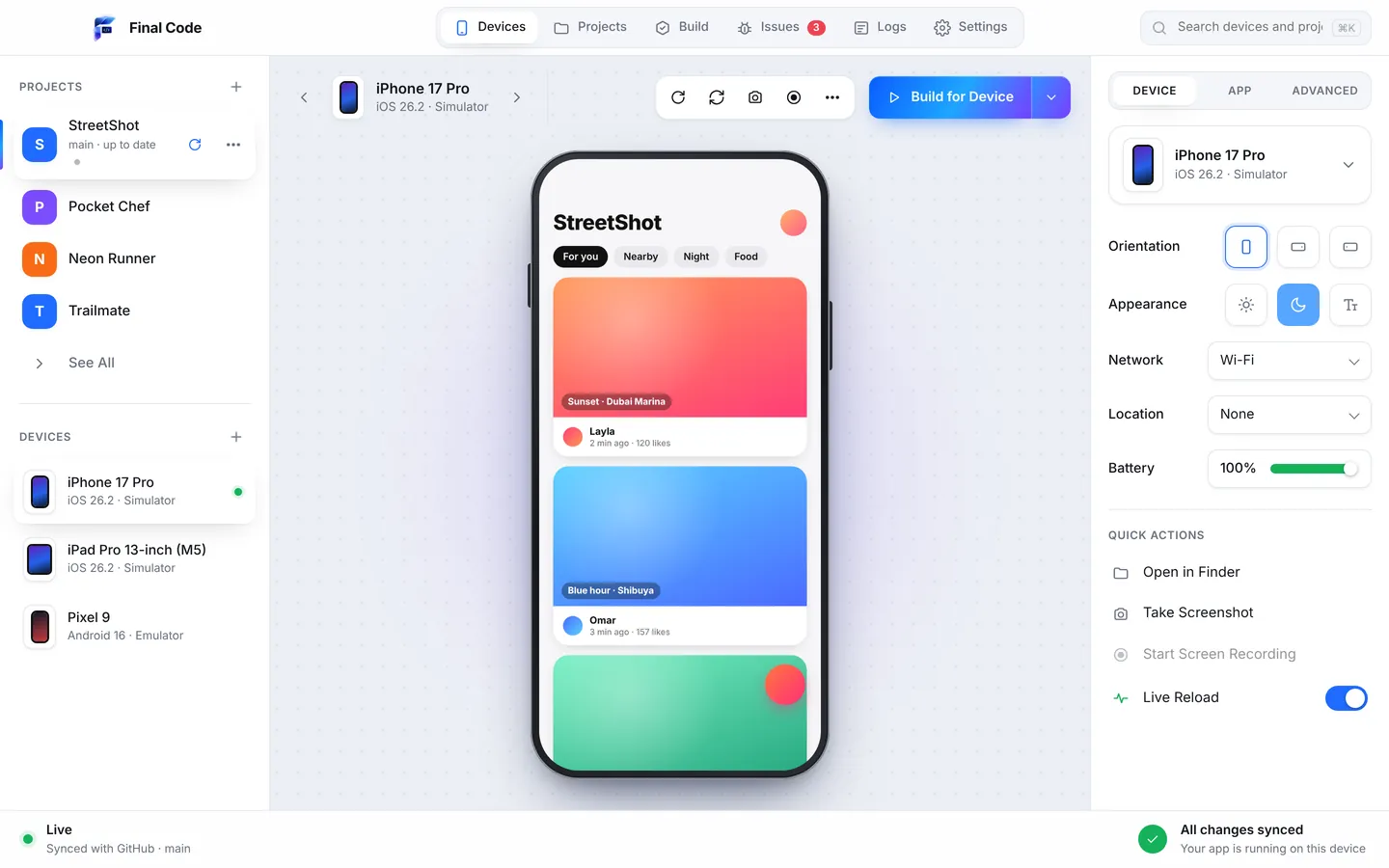
Xcode is where Swift lives, and it is a remarkable tool for writing code, designing interfaces and debugging. But running a SwiftUI app on an iPhone, the everyday part, still has more friction than it should. Scheme menus, destination pickers, provisioning profiles, "untrusted developer" alerts, one simulator window at a time. Final Code takes that part off Xcode's plate so you can run your SwiftUI app on iPhone without the hassle.
Keep writing code wherever you like: Xcode, another editor, or with an AI assistant. Final Code opens your Xcode project or workspace, works out what to build, and puts the app on the simulators and iPhones you picked. You still need Xcode installed on the Mac, because Final Code uses Apple's own build tools. You just do not have to babysit it.
Test your iOS app on a real iPhone in a few clicks
The simulator is great for layout, but it runs on your Mac's processor and memory. Real phones are where you find out about camera and photo permissions, background behaviour, memory warnings on older models, haptics and true scrolling smoothness. Final Code makes it easy to test an iOS app on a real iPhone every time you change something meaningful.
Connect the iPhone by cable, unlock it and tap Trust. Final Code signs the app automatically with your App Store Connect API key or the Apple account already in Xcode, in every project. It installs a real release build, the same kind your users will download, in seconds to minutes. Think TestFlight without the upload, the processing wait or the review.
How it works
Open the Xcode project or workspace
Swift, SwiftUI and Objective-C projects are detected automatically, including workspaces with CocoaPods. Open a local folder or any GitHub repository and branch.
Pick simulators and iPhones
Add iPhone and iPad simulators in one click. Connected iPhones show up by themselves. Show them all or one at a time.
Press Run
Final Code builds with a compiler cache to save time, signs for your devices, installs and launches. A progress bar shows the percentage and time left.
Read the result, not the noise
Logs stream from every device. Crashes arrive with readable function names, grouped into issues with the device and the lines just before.
An iOS Simulator manager
Open several simulators, mirrored live in one window. Click and swipe to touch, type with your keyboard, rotate, press home, or pop one out into its own window.
Automatic signing for your iPhone
No provisioning profile puzzles for everyday testing. Final Code signs apps for your iPhone with the account in Xcode or an App Store Connect API key.
The iPhone Duo simulator
Apple's foldable has a cover screen and a large inner screen. Final Code can create the iPhone Duo simulator for you, as long as you have a recent Xcode.
Inspector for real conditions
Flip to landscape, switch to dark appearance, turn on larger text, go offline or to 5G, set GPS to London or San Francisco, and change the battery level.
Readable crash reports
When the app closes on an iPhone, Final Code pulls the crash report from the phone and shows it with your own function names, not raw memory addresses.
Build history
Every build installed on a phone is kept with its commit, date and size. Put any of them back on any device with one click when you need to compare.
Why use an iOS Simulator manager at all?
Apple ships dozens of simulator models and OS versions, and it is easy to end up testing on just the one you used last. SwiftUI layouts that look perfect on a large iPhone Pro can clip on a small screen, and a sidebar that works on iPad may collapse oddly in Split View. Flipping between several devices catches this in seconds.
Final Code shows every simulator in one window, so a change to a VStack or a NavigationSplitView is visible on an iPhone and an iPad together. Use the inspector to check dark appearance and larger text without digging through Settings in each simulator. Screenshot one device or all of them, record the screen, and open the screenshots folder when you are done.
Swift crashes and errors Final Code makes easy to read
Native iOS bugs are often clear once you can see them, and baffling when you cannot. Here are some classics and how they show up in Final Code.
"Unexpectedly found nil while unwrapping an Optional value"
A force unwrap that worked in your test data meets an empty field in the real world. On the phone, the app simply closes. Final Code pulls the crash report, symbolicates it into readable function names, and opens an issue with the device and the log lines before the crash.
Missing privacy descriptions
If your app asks for the camera, photos, location or microphone without the matching description in Info.plist, iOS stops it straight away. In the simulator you may not even reach that code. On a real iPhone you will, and the log tells you which key is missing.
Signing and trust errors
"Untrusted developer", expired profiles, a team not selected. Automatic signing in Final Code removes most of these, and the Issues box explains the rest in plain words.
Workspaces with missing tools
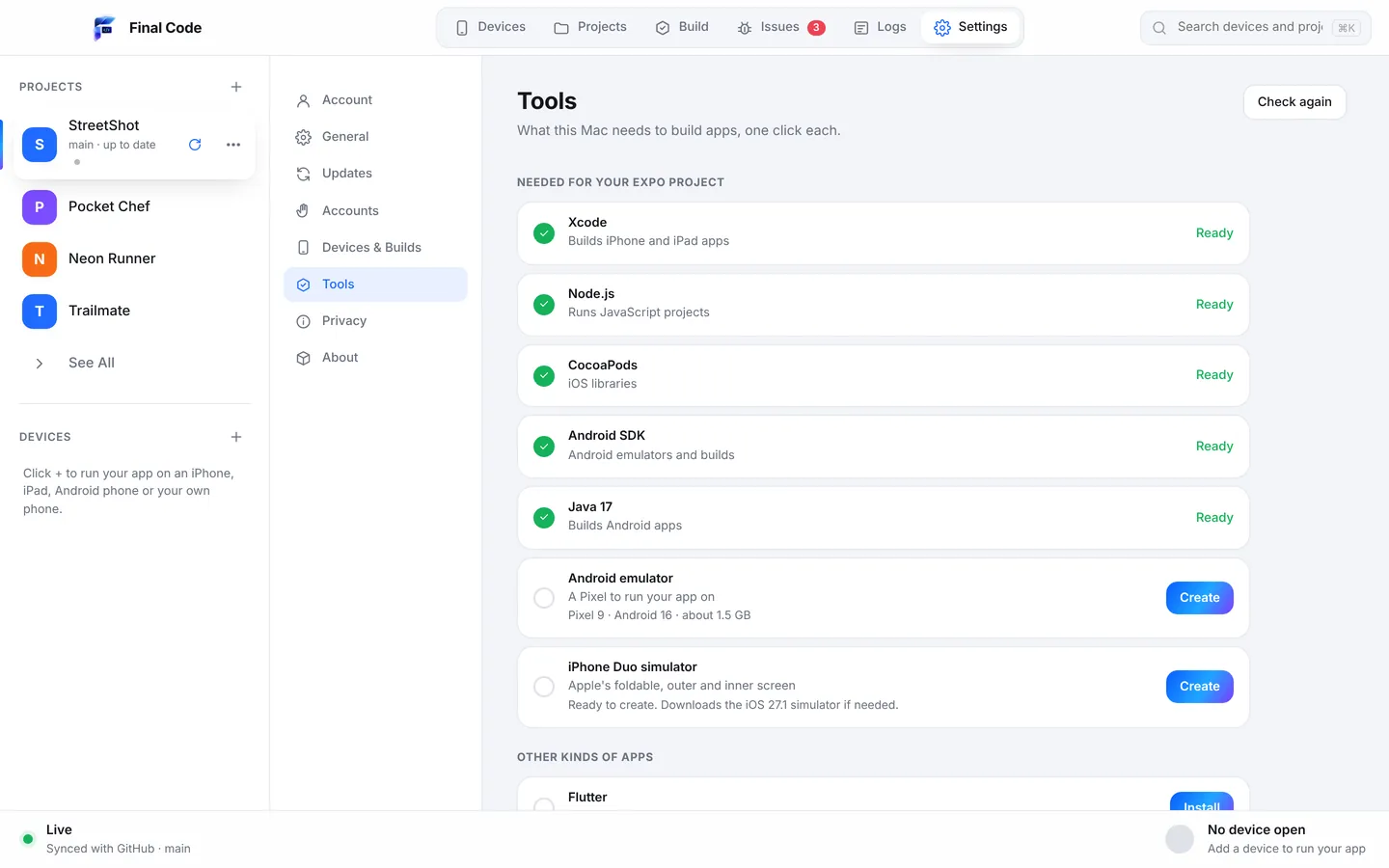
Older projects built on CocoaPods fail to build if CocoaPods is not installed or the right Xcode components are missing. The Project check notices missing tools when the project opens, and Settings then Tools installs them with one click each.
Behaviour that changes in release builds
Compiler optimisations, different build settings and stripped debug code can change how an app behaves. Because real phones get release builds, you see the version your users will see.
For people new to iOS development
Your first SwiftUI app runs in the preview canvas, and that feels like magic. Then you try to put it on your own iPhone and meet developer mode, trust prompts and signing teams. Final Code is made to get you past that in minutes. When something is missing, Final Code opens Settings → Tools and installs it in one click each: Xcode components, simulators, the Android SDK, Java, CocoaPods and Node.
When the app crashes, you get a plain explanation instead of a wall of hex. With Share problem, press "Explain this problem" and Claude explains what happened and what to do next. You can also copy the report for any AI tool. If you want to read first, try the guide to testing on iPhone and Android.
For iOS teams
In a team, the questions are always the same. Which build is on that test phone? When did this start? Did the last merge fix it? Final Code answers them. Build history keeps every phone build with its commit, so you can reinstall the one from before a merge in one click. The Issues box counts how often each crash happens and closes it as "looks fixed" when new code runs three minutes without it, reopening it if it comes back.
Final Code checks GitHub every minute, pulls new commits and reloads, so the test devices on your desk follow the branch you care about. Local edits are kept or stashed, never lost. If your company also has an Android app, the same membership covers Kotlin and Java projects, plus Flutter and React Native. Up to three Macs per membership; see pricing.
Swift apps written with AI assistants
Claude, ChatGPT, Cursor, GitHub Copilot, Gemini and Windsurf all write Swift, and they are getting good at SwiftUI. What they still miss is the moment the app meets a real device. A view that compiles can still crash on launch because of a missing permission string, or a force unwrap on a value that is empty on first run.
Final Code gives your assistant a way to check. It keeps a .finalcode folder in the project, never committed, with live status, logs, issues, screenshots and the build log. The AI can read it and ask Final Code to build, run, tap, swipe, type, take screenshots and read the phone log. If the assistant pushes to GitHub, Final Code picks up the change and rebuilds by itself. More on the AI app builders page.
Final Code, Xcode, the Simulator and TestFlight
Xcode is free, official and the only place to do some things, like Interface Builder, Instruments and the full debugger. The Simulator app ships with it and is excellent, though it shows Apple platforms only and each device as its own window. TestFlight is Apple's great way to send a finished build to testers, after an upload, processing and, for outside testers, a review. Final Code works alongside all three: it uses Apple's tools to build, puts release builds on your own iPhones in seconds to minutes, shows simulators, and collects logs and crashes. Compare with the Xcode Simulator or TestFlight in detail, or see all comparisons.
Product names are trademarks of their owners. Comparison based on publicly available information as of October 2026.
Final Code is a native, beautifully designed Mac app for macOS 13 or later, one download for Apple silicon and Intel, signed and notarized by Apple. Your code never leaves your Mac. Explore all features.
How do I run a SwiftUI app on my iPhone without the hassle?
Install Xcode, then open your project in Final Code. Connect your iPhone by cable, unlock it and tap Trust. Final Code signs the app automatically with the account in Xcode or an App Store Connect API key, builds a release version and installs it. No scheme or destination menus needed.
Do I still need Xcode installed?
Yes. Final Code uses Apple's own build tools, which come with Xcode. You do not need to work inside Xcode to run and test, though. Final Code installs missing Xcode components and simulators for you in one click each.
What is a good iOS Simulator manager for Mac?
Final Code opens several iOS Simulators at once and mirrors them in one window, one click apart, with an inspector for orientation, dark mode, larger text, network, GPS location and battery level. It can also create the iPhone Duo simulator with a recent Xcode.
How do I test an iOS app on a real iPhone without TestFlight?
Connect the iPhone to your Mac and run the app from Final Code. It installs a real release build directly, in seconds to minutes, with no upload or processing. Use TestFlight later to reach testers who are not at your desk.
Can I read iPhone crash reports with my own function names?
Yes. When an app closes on an iPhone, Final Code pulls the crash report from the phone and shows it with readable function names. It is attached to an issue with the device, the build and the log lines just before the crash.
Does Final Code support Objective-C and CocoaPods workspaces?
Yes. Native iOS projects in Swift, SwiftUI or Objective-C, as Xcode projects or workspaces, are detected automatically. If CocoaPods is missing, the Tools screen installs it with one click.
Can I test my app on the iPhone Duo foldable?
Final Code can create the iPhone Duo simulator for you when you have a recent Xcode installed. You can then run your app on it next to other iPhone and iPad simulators.
How much does Final Code cost?
Start a free 14-day trial in the app, no card needed. Then choose $29 per month or $249 per year. One membership works on up to three Macs and covers every project type. Cancel any time.
Less clicking in Xcode. More time on your app.
Download Final Code and run your Swift app on simulators and iPhones.