 Final Code
Run and test React Native apps on real iPhones and Android phones
One Mac app builds your React Native project, installs it on every phone you plug in, and opens simulators and emulators next to them.
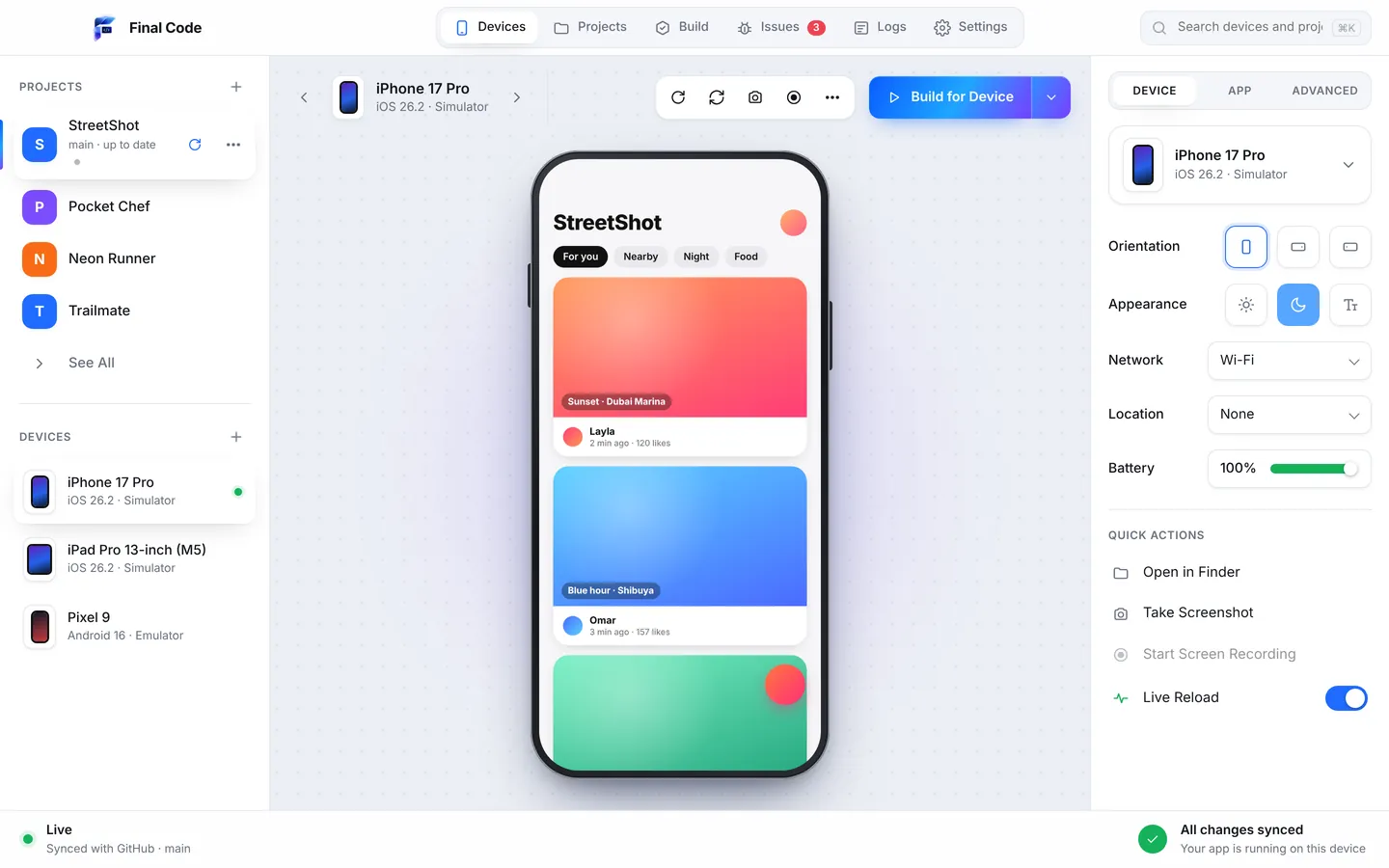
React Native testing on device usually means two terminals, Xcode open in one corner, Android Studio in another, and a phone cable that only works in one USB port. Final Code replaces that juggling act with a single window. Open your project, pick the phones, press Run. The app builds for iOS and Android, lands on every device you chose, and streams its logs back to you.
It works with bare React Native projects out of the box. There are no config files to write and no scripts to add. Final Code reads the project, works out how to build it, and gets on with it. If you use Expo, there is a dedicated page for Expo projects too.
Why React Native testing on device matters
A React Native app is two apps glued together: your JavaScript, and the native shell that runs it. During development, the JavaScript is served from your Mac and loaded in debug mode. That is great for speed, but it is not what your users get. In the App Store and Google Play, your code is bundled, minified and run inside a release build.
A surprising number of bugs only appear in that release build. A library that worked fine in debug crashes on launch. An image path that resolved on the simulator is missing from the bundle. An API that your code still calls was removed in the React Native version you upgraded to, and the debug runtime happened to forgive it. These are the bugs that reach real users, because nobody saw them on their desk.
That is why Final Code puts real release builds on real phones. Think of it like TestFlight, minus the upload and the processing queue. The build goes straight from your Mac to the iPhone or Android phone on the cable, in seconds to minutes, with your code inside. What you test is what your users will run.
How it works
Open the project
Pick a folder on your Mac or one of your GitHub repositories. Final Code spots that it is React Native, finds the iOS and Android folders, and handles monorepos with several apps.
Let the Project check run
Before the first build, it looks for missing tools, missing babel plugins, files your app loads that are not there, and React Native APIs your code still uses after they were removed.
Choose your devices
Plugged-in iPhones and Android phones appear by themselves. Add an iOS Simulator and an Android Emulator in one click each, and show them all.
Press Run and edit
The first native build takes a few minutes. After that, saved changes appear on every simulator and emulator with Fast Refresh, and native rebuilds only happen when native code or libraries change.
A React Native simulator on Mac, done right
Simulators and emulators are mirrored live inside the window. Click and swipe to touch, type with your keyboard, rotate, and press home or back. Pop any device into its own window when you want it bigger.
Release builds on real phones
iPhones connect by cable. Android phones connect by cable with USB debugging, or over Wi-Fi with a pairing code. Each gets a real release build, signed for you.
Every open device updates
Save a file and every open simulator and emulator refreshes together. Compare the iPhone and Android layouts in the same second instead of switching apps.
One deduplicated Issues box
Red screens, JavaScript exceptions, native crashes and failed builds become one issue each, with the stack, the device and the log lines just before.
Phone session logs
Each launch on a real phone gets its own log file: your JavaScript console, the phone's native output, build and install steps, and crash reports with readable function names.
Build history you can reinstall
Every build that reached a phone is kept with its commit, date and size. Put an older one back on any device in one click to find out when a bug first appeared.
React Native problems Final Code catches before your users do
The Project check runs when you open a project and again whenever new code arrives from GitHub. It explains each finding in plain words, fixes what is safe to fix by itself, and gives you one button for the rest. Here are the kinds of problems it is built for.
APIs removed in your React Native version
You upgrade React Native, everything looks fine on the simulator, and then the release build closes the moment it opens. Often the cause is a call to an API that the new version removed. Final Code looks for those calls in your code and flags them before you ship, because this is exactly the kind of crash that only shows up in a release build.
A missing babel plugin
Some popular libraries need a babel plugin to work. Forget it and you get confusing errors that point nowhere near the real cause. The Project check notices when a plugin is missing and tells you which one.
Worklets that use code declared below them
Animation worklets run on a separate thread, and they can trip over functions or values that are declared further down the file. The result is a crash that looks random. Final Code points to the worklet and the line it depends on.
Files your app loads that are not there
A renamed image, a font that was never committed, a JSON file left out of the repo. In debug these sometimes slip through. In a release bundle they break. The check lists the missing files so you can add them.
Patched libraries that store builds do not have
When Final Code has to patch a library on your Mac to get a build working, it shows a "Store builds need a fix" notice. One button adds the same fix to your project with patch-package and pushes it, so your TestFlight, App Store, EAS and Play builds get it too.
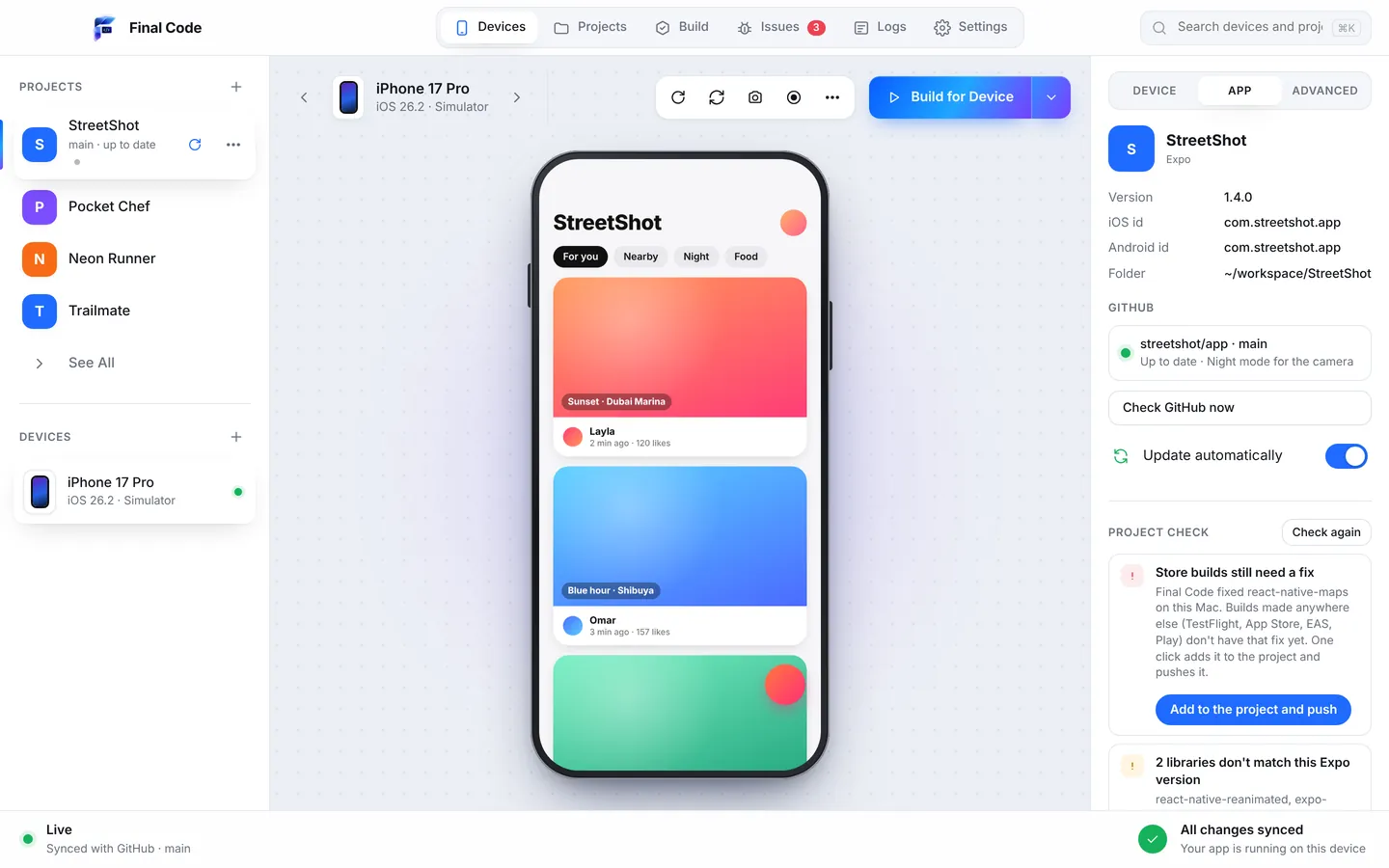
The React Native Android emulator, without Android Studio
If you have only ever built for iPhone, setting up Android can eat an afternoon. You need Java, the Android SDK, the right platform tools and an emulator image. In Final Code, Settings and then Tools shows what your Mac has and what it is missing. One click installs or fixes each item, including the Android SDK, emulators, Java, CocoaPods, Node and Xcode components.
Once that is done, the Android Emulator opens inside the same window as your iOS Simulator. Use the inspector on each device to switch to landscape, dark mode or larger text, set the network to Wi-Fi, 5G or offline, pick a GPS location like London or Tokyo, or change the battery level. It is a quick way to see how your React Native layout copes with the conditions real people use their phones in.
Run React Native on iPhone without the signing headache
Signing is where many first attempts to run React Native on iPhone stall. Final Code uses your App Store Connect API key, or the Apple account you already added to Xcode, and signs apps for your iPhone automatically in every project. Unlock the phone, tap Trust, and the build installs.
If something goes wrong on the phone, the crash report is pulled into Final Code with readable function names. You do not need to dig through device logs to work out which part of your app closed.
For beginners
Maybe you followed a tutorial, the app runs in one simulator, and you have no idea how to get it onto your own phone. That is a very normal place to be. Final Code is built so you never have to open a terminal. When something is missing, Final Code opens Settings → Tools and installs it in one click each: Xcode components, simulators, the Android SDK, Java, CocoaPods and Node.
When an error does appear, the Issues box tells you what happened in plain words. With the Share problem report, you can press "Explain this problem" and Claude walks you through the cause and the next steps. If you prefer another assistant, copy the report for any AI tool. Our guide to testing an app on iPhone and Android is a good first read.
For teams and agencies
On a team, the hard part is not running the app once. It is knowing which build has which bug. Final Code keeps every build that went to a phone, tagged with its commit, so a designer, tester or developer can reinstall last Tuesday's build and compare. Android builds can be shared with anyone on the same Wi-Fi by link and QR code, which is handy in a client meeting.
Projects stay in sync with GitHub. Final Code checks every minute, pulls new commits, and reloads every open device. Local edits are protected: they are kept, or saved to a git stash, never thrown away. Agencies with several client apps in one monorepo can switch between apps such as apps/user and apps/admin in one click. A membership covers up to three Macs; see pricing for the details.
React Native apps built with AI
A lot of React Native code today is written by AI coding assistants like Claude, ChatGPT, Cursor, GitHub Copilot, Gemini and Windsurf. They write fast, but they cannot see a phone. That is where many AI-built apps go wrong: the code compiles, the assistant says it is done, and the app crashes on a real device.
Final Code writes a .finalcode folder inside your project, which is never committed. It holds live status, logs, issues, screenshots and the build log. Your AI assistant can read it, and ask Final Code to build, run, reload, tap, swipe, type, take screenshots and read the phone log. In other words, the AI can check its own work on real devices. If your assistant pushes code to GitHub, Final Code picks it up and rebuilds by itself. Read more on our page for people building apps with AI.
How it compares with the usual React Native tools
The React Native CLI, Xcode and Android Studio are free, official and powerful, and Final Code uses the same Apple and Android tools under the hood. They are separate apps, though, and each one shows one side of your app. The Xcode Simulator only runs Apple platforms; the Android Emulator lives in its own world. TestFlight is excellent for handing a finished build to testers, but builds go through an upload and processing step first and it covers iPhone only. Final Code is the all-in-one place for the hundred test runs before that point, on iPhone and Android together. See the full breakdowns: Final Code vs the Xcode Simulator, vs Android Studio and vs TestFlight, or browse all comparisons.
Product names are trademarks of their owners. Comparison based on publicly available information as of October 2026.
Built with the latest technology, made to be easy to use
Final Code is a native Mac app for macOS 13 Ventura or later, one universal download for Apple silicon and Intel. It is beautifully designed, but more importantly it is fast: a shared download cache is reused by every project, and a compiler cache speeds up native builds. Your code never leaves your Mac, and there is no analytics in the app. Take a tour of every feature, or look at how we handle Flutter and web apps if you work across stacks.
How do I run a React Native app on my iPhone?
Install Xcode from the Mac App Store, open your project in Final Code, connect the iPhone by cable, unlock it and tap Trust. Final Code signs the app with your Apple account or App Store Connect API key, makes a release build and installs it. The first build takes a few minutes; later ones reuse the last build when only JavaScript changed.
What is the best React Native simulator for Mac?
Apple's iOS Simulator and Google's Android Emulator are the real engines, and both run on a Mac. Final Code shows them in one window, mirrored live, so you can click, swipe, type and rotate. It also adds an inspector for dark mode, larger text, network, GPS location and battery level on each device.
Can I test a React Native release build without TestFlight?
Yes. Final Code puts real release builds straight on iPhones and Android phones connected to your Mac, in seconds to minutes. There is no upload or processing step. Use it for daily testing, then send the finished version to TestFlight or Google Play when you are ready for outside testers.
Why does my React Native app crash only in release builds?
Common causes are APIs removed in your React Native version, files the app loads that are missing from the bundle, missing babel plugins and worklets that use code declared below them. Final Code's Project check looks for these when a project opens and when new code arrives, and the Issues box shows release crashes with the stack.
Do I need Android Studio to use the React Native Android emulator?
No. Final Code's Tools screen installs the Android SDK, emulators and Java in one click each, and the emulator runs inside the Final Code window. You can still use Android Studio for editing native Android code if you like.
Does Final Code work with React Native monorepos?
Yes. Monorepos with several apps, such as apps/user and apps/admin, are detected automatically. You switch between the apps in one click, and each keeps its own issues, logs and build history. Projects without git work too.
Can I test on Android over Wi-Fi?
Yes. Android phones connect by cable with USB debugging turned on, or over Wi-Fi with a pairing code. You can also share an Android build with anyone on the same Wi-Fi using a link and a QR code.
How much does Final Code cost for React Native developers?
Every project type is included. Start with a free 14-day trial right in the app, with no card needed. After that it is $29 per month or $249 per year, for up to three Macs. You can cancel any time. Prices are in US dollars and taxes may apply.
Put your React Native app on every phone today
Download Final Code, open your project and see it running on iPhone and Android in minutes.