 Final Code
The Android emulator on Mac, plus real Android phones, in one window
Build your Kotlin or Java Gradle project on a Mac and run it on emulators and Android phones, with the SDK and Java set up for you.
Lots of Android developers work on a Mac, and lots of Mac users have never touched Android. Both groups hit the same setup wall: the right Java version, the Android SDK, platform tools, system images, emulator settings and a phone that refuses to show up. Final Code turns that wall into a short list with a button next to each line.
Once your Mac is ready, Final Code opens your Kotlin or Java Gradle project, builds it, and runs it on an Android emulator on your Mac and on real Android phones. All of them appear mirrored in one window. If you also ship an iPhone version, the iOS Simulator can sit right next to them.
Android testing on a Mac without the setup afternoon
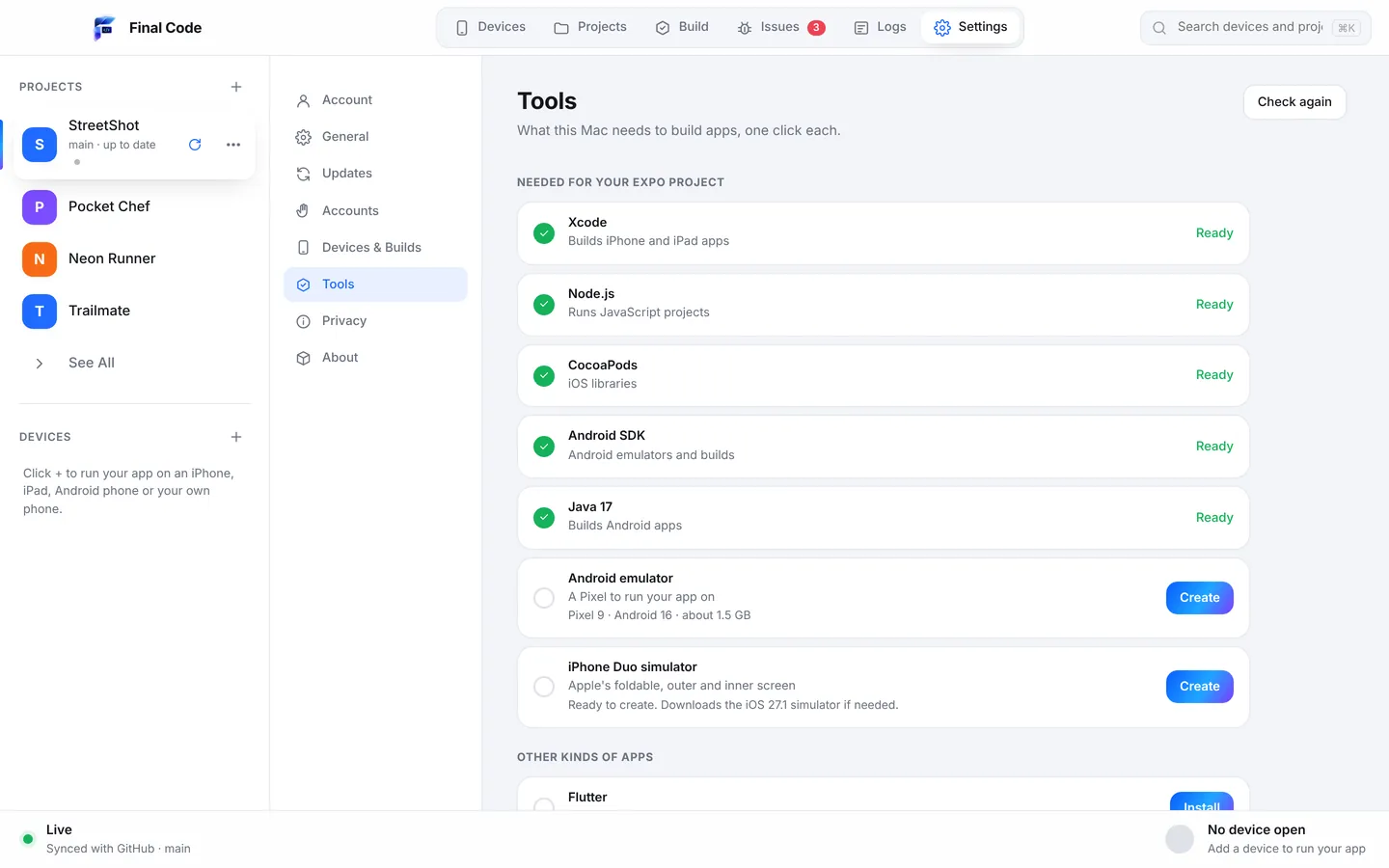
Open Settings, then Tools, and Final Code shows what your Mac has and what it is missing. The Android SDK is found automatically if you already have it. If not, one click installs it. The same goes for emulators and Java. When you open a project, the Project check looks for missing tools again, so a new teammate's Mac gets caught up before the first build fails.
You do not need a terminal for any of this, and you do not need to learn which environment variables point where. Final Code keeps track of it.
How it works
Open the Gradle project
Final Code recognises native Android projects written in Kotlin or Java. Open a folder on your Mac or a repository and branch from GitHub.
Install what is missing
The Tools screen lists the Android SDK, emulators and Java. Click to install or fix each one. Already set up? Final Code finds your SDK on its own.
Connect devices
Start an emulator in one click. Plug in a phone with USB debugging on, or pair one over Wi-Fi with a code. Each appears in the device list.
Run and follow the log
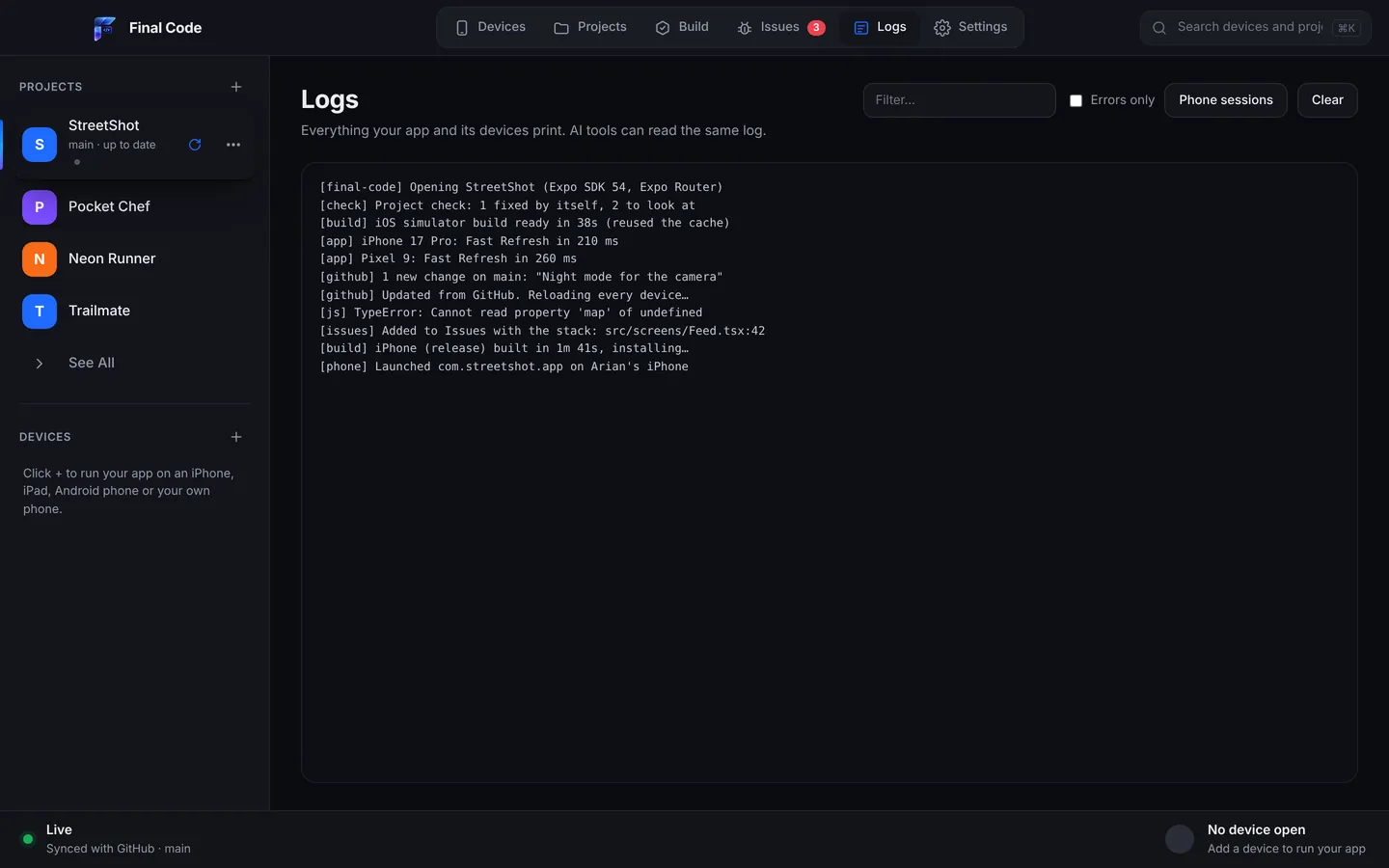
Final Code builds, installs and launches the app, streams the phone's output, and turns crashes and build errors into clear issues.
Emulators inside the window
The Android Emulator is mirrored live in Final Code. Click and swipe to touch, type with your keyboard, rotate, and use the back and home buttons, next to your other devices.
Phones over Wi-Fi
Pair an Android phone with a code and leave the cable in the drawer. Handy when the phone is on a stand, charging, or across the desk.
Release builds on hardware
Real phones get a real release build with your code inside, so shrinking, obfuscation and release settings are tested the way they ship.
APK sharing by QR code
Anyone on the same Wi-Fi can install your Android build from a link or by scanning a QR code. No store listing, no account.
Gradle failures as issues
A failed build becomes one issue with the log lines that matter, instead of a few thousand lines of scroll-back. It closes by itself once the fix is in.
Faster rebuilds
A shared download cache is reused by every project, and a compiler cache speeds up native builds. The first build takes a few minutes; later ones are much quicker.
Run a Kotlin app on an Android phone from your Mac
Emulators are fast and convenient, but real Android phones vary wildly. Screen sizes, manufacturer skins, aggressive battery savers and older Android versions all change how your app behaves. To run a Kotlin app on an Android phone from a Mac, connect it by cable with USB debugging turned on, or use the Wi-Fi pairing code. Final Code builds the app, installs it and launches it.
Each launch on a real phone gets its own session log file, holding the app's output, the phone's native log, every build and install step, and crash reports with readable function names. Every build that reaches a phone is kept in the build history with its commit, date and size, so you can put an earlier build back on any device in one click.
Android problems you will recognise
Some Android bugs are rites of passage. Final Code helps you spot them fast and keeps the evidence in one place.
Java and Gradle version mismatches
The Android Gradle Plugin expects a particular Java version. Use the wrong one and the build fails before your code even compiles. Final Code's Project check looks for missing tools, the Tools screen installs Java with one click, and a failed build shows up as an issue with the relevant lines.
Classes removed by code shrinking
Release builds usually shrink and obfuscate code. A class that is only reached through reflection, a serialization library or a JSON model can disappear, and the app crashes with a ClassNotFoundException that never happens in debug. Release builds on real phones catch this early.
Work on the main thread
A network call or heavy database query on the main thread leads to a NetworkOnMainThreadException or an "app isn't responding" dialog. The stack trace in the Issues box points to the exact function.
Layouts that break on other screens
A Compose screen tuned on one emulator can overflow on a small phone or look stretched on a tablet. Switch between devices with the inspector set to larger text or landscape and you see it in seconds.
A backend that is not set up
When a sign-in method is switched off in Supabase, or Firebase is not set up yet, an Android app often fails quietly. Final Code explains setup problems like these and links to the right dashboard.
For beginners learning Android
If you are a Mac user writing your first Kotlin app, Android can feel like a different planet. Final Code keeps it friendly. When something is missing, Final Code opens Settings → Tools and installs it in one click each: Xcode components, simulators, the Android SDK, Java, CocoaPods and Node. Every step is explained in plain words, with the right button next to it.
When an error appears, you get it in plain words, not a stack of Gradle output. Share problem collects what happened, the file and line with the code around it, what changed since the app last worked, the device and the Mac, with passwords, keys and tokens removed. Press "Explain this problem" for Claude's step-by-step explanation, or copy it for any AI tool. The iPhone and Android testing guide is a gentle starting point.
For Android teams on Macs
Many teams build Android and iOS on the same Macs. Final Code lets each developer run the Android app and, if they have one, the iOS app, from the same window. It checks GitHub every minute, pulls new commits and reloads every open device. Local edits are kept, or saved to a git stash, never lost.
QA can keep a shelf of Android phones connected over Wi-Fi and always test the newest commit. The Issues box keeps one deduplicated entry per crash with counts and devices, so you can see whether a problem hits one model or all of them. Testers outside the team can install a build from a QR code on the same Wi-Fi. One membership covers up to three Macs and every project type; see pricing. Teams with an iOS app should also read our Swift and SwiftUI page.
Android apps built with AI coding tools
AI assistants such as Claude, ChatGPT, Cursor, GitHub Copilot, Gemini and Windsurf write a lot of Kotlin. They are quick, but they guess at library versions and they never see the emulator. Final Code lets them check their work. It keeps a .finalcode folder in the project, never committed, with live status, logs, issues, screenshots and the build log.
The assistant can read it, then ask Final Code to build, run, reload, tap, swipe, type, take screenshots and read the phone log. So a Gradle failure or a crash on launch is something the AI notices and fixes, instead of something you discover later. When the AI pushes code to GitHub, Final Code picks it up and rebuilds. See the AI app builders page.
Final Code and Android Studio
Android Studio is Google's free, official IDE, with a superb Kotlin editor, layout tools, profilers and its own emulator manager. It is the right place to write and profile Android code, and Final Code does not try to replace it. Final Code is for running and testing: emulators and real phones mirrored together in one window, Wi-Fi pairing, release builds on hardware, grouped issues, session logs, build history, QR sharing, GitHub sync, and the iOS side of your app in the same place. Read Final Code vs Android Studio, or see all comparisons.
Product names are trademarks of their owners. Comparison based on publicly available information as of October 2026.
Building cross-platform instead? See Flutter and React Native. For the complete list of what Final Code can do, visit features.
Can I run an Android emulator on a Mac?
Yes. Android Emulators run on both Apple silicon and Intel Macs. Final Code installs the Android SDK, emulators and Java in one click each, and shows the emulator mirrored inside its own window, where you can click, swipe, type, rotate and press back or home.
How do I run a Kotlin app on my Android phone from a Mac?
Turn on USB debugging on the phone and connect it by cable, or pair it over Wi-Fi with a code. Open your Gradle project in Final Code, pick the phone and press Run. It builds a release version, installs it and launches it.
What do I need for Android testing on a Mac?
A Mac with macOS 13 or later, the Android SDK, an emulator image and Java. Final Code finds the SDK if you already have it and installs anything missing from Settings, Tools. No terminal is needed.
Do I still need Android Studio?
Not to build, run and test your app. Final Code handles the SDK, emulators and builds. Android Studio remains a great editor and profiler, and you can use it alongside Final Code.
Why does my Android app crash only in release builds?
Release builds often shrink and obfuscate code, which can remove classes used through reflection or serialization. Final Code installs real release builds on real phones and shows the crash with a readable stack, so you find these before publishing.
Can I connect an Android phone over Wi-Fi?
Yes. Final Code pairs Android phones over Wi-Fi with a pairing code. After that the phone appears in the device list like any other, without a cable.
How do I share an APK with a tester?
Anyone on the same Wi-Fi can install your Android build from a link or by scanning the QR code Final Code shows. Every build is also kept in the build history with its commit and date.
Is there a free trial?
Yes, 14 days, started in the app with no card needed. After that, Final Code costs $29 per month or $249 per year, for up to three Macs. Prices are in US dollars; taxes may apply.
Android on your Mac, finally simple
Download Final Code, let it set up the Android tools, and run your app on emulators and phones.