 Final Code
An Expo Go alternative with real builds, dev clients and no version surprises
Test your Expo app on iPhone and Android the way your users will get it, straight from your Mac, with Expo Router and custom native code included.
Expo Go is a brilliant way to start. Scan a QR code and your first screen is on your phone. Then the project grows. You add a library with its own native code, or the Expo Go app on your phone moves to a newer SDK than your project, and suddenly the QR code stops being the easy path. If you are searching for an Expo Go alternative, you are probably at that point now.
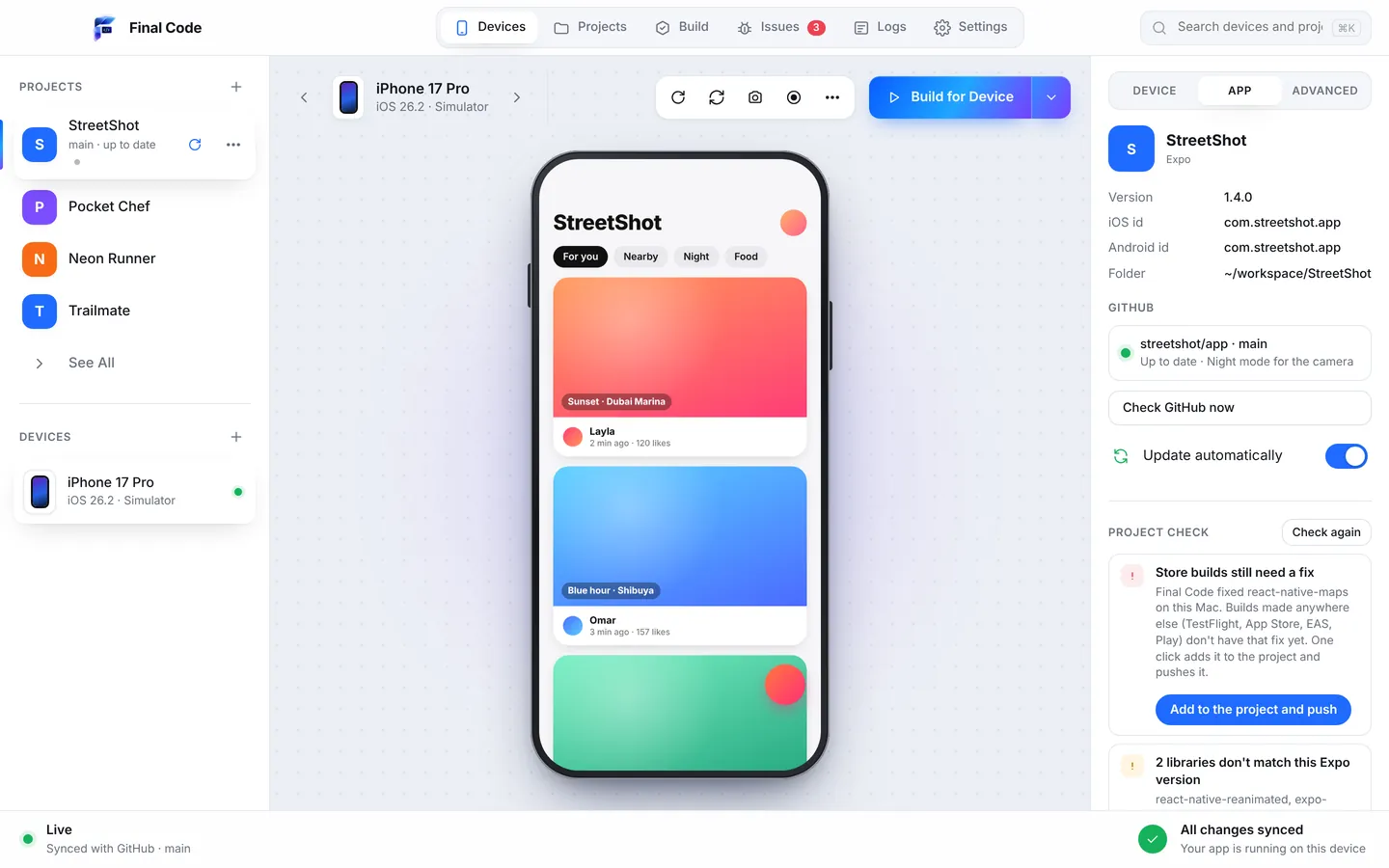
Final Code is a Mac app that takes your Expo project, whatever shape it is in, and runs it on real iPhones, Android phones, iOS Simulators and Android Emulators. Managed or bare, with or without a development client, using Expo Router or not. It detects all of it by itself, with no setup files.
Why look for an Expo Go alternative?
Expo Go is a ready-made app from the store. It contains a fixed set of native modules and runs one Expo SDK version. Your app's JavaScript is loaded into it. That design is what makes it instant, and it is also its limit.
- Custom native code does not fit. If a library needs native code that is not already inside Expo Go, it cannot load there.
- The SDK has to match. When Expo Go updates and your project has not, you are stuck until you upgrade or switch to a different way of testing.
- It is not your app. Your icon, splash screen, permissions text and app config are not the ones users will see. Bugs in those parts hide until a store build.
Expo's own answer is the development build: your own app with the Expo developer tools inside. It is the right idea. Final Code makes it effortless, and adds a step further: real release builds on real phones, so you can test an Expo app on a real device exactly as it will ship.
How it works
Open your Expo project
From a folder on your Mac or straight from GitHub. Final Code reads your app config and package file and knows whether it is managed, bare or using a development client.
Fix version mismatches in one go
The Project check compares your libraries to your Expo SDK version. Anything that does not match is listed in plain words, with safe fixes applied for you and one button for the rest.
Pick simulators, emulators and phones
Open an iPhone simulator and an Android emulator in a click. Plug in your own iPhone, or pair an Android phone over Wi-Fi with a code.
Run and keep coding
The native part builds once, then edits show on every simulator and emulator together with Fast Refresh. Real phones get a release build with your code inside.
Every Expo setup
Managed workflow, bare workflow, prebuild folders checked in or not, development client or none. Expo Router apps work as they are, with no extra steps.
Version mismatches fixed
Libraries that do not match your Expo version are one of the most common reasons an Expo build fails. Final Code spots them early and tells you what to change.
Release builds, not previews
On a real iPhone or Android phone you get a real release build, signed for you, in seconds to minutes. No upload, no processing queue, no waiting for a cloud build slot.
Fixes that reach EAS too
If Final Code patches a library locally, "Store builds need a fix" adds the same patch to your project with patch-package and pushes it, so EAS, TestFlight and Play builds include it.
Monorepos understood
Expo apps often live in a workspace next to a web app or an admin app. Final Code detects each app in the monorepo and lets you switch in one click.
The real device inspector
Flip any device to landscape, dark mode or larger text, cut the network to offline, set GPS to Dubai or New York, or drop the battery level, all from the side panel.
The Expo development build, without the busywork
An Expo development build is your own app with a developer menu, built once and then fed fresh JavaScript as you code. It solves the native module problem, but you still have to create it, install it on every device, and rebuild it whenever you add a library with native code. People often forget that last part and lose an hour to an error about a module that "cannot be found".
Final Code handles that loop for you. It only rebuilds the native side when native code or libraries change; otherwise it reuses the last build. When you do add a native library, it notices and rebuilds automatically. A shared download cache is reused by every project and a compiler cache speeds up the native step, so even the rebuilds are fast.
Common Expo errors and what Final Code does about them
"This library does not match your Expo SDK"
You installed a package with a plain install command, and it pulled the newest version instead of the one your SDK expects. The app builds, then behaves strangely or crashes. The Project check catches libraries that do not match your Expo version and tells you which ones to change.
Missing babel plugins after adding animations
Some animation and gesture libraries need a babel plugin. Without it, you see errors that seem unrelated. Final Code checks for missing babel plugins when the project opens.
Assets that only break in production
An image referenced by a path that changed, or a font that never made it into git. Final Code flags files the app loads that are missing, so the release build does not discover them for you.
Sign-in that silently fails
Many Expo apps use Supabase or Firebase for accounts. When a sign-in method is switched off in the dashboard, or Firebase is not set up, the app often just shows a spinner. Final Code explains these setup problems and gives you the right dashboard link to fix them.
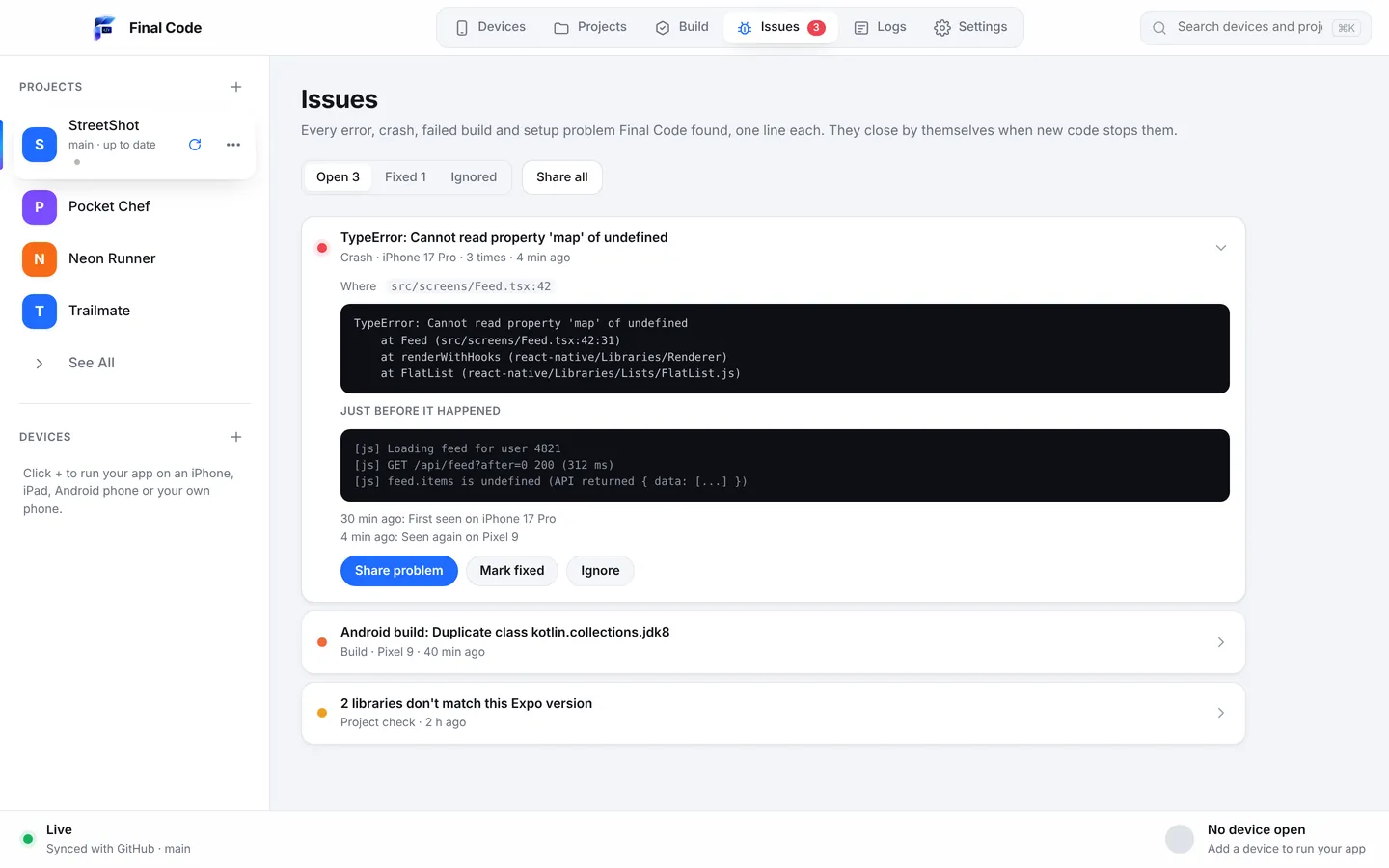
Everything that goes wrong lands in the Issues box: errors, crashes, failed builds, setup problems and check findings. Each becomes one issue per project, with a count, the device, the stack and the log lines just before. When new code runs for three minutes without the issue, it closes itself as "looks fixed". If the bug comes back, the issue reopens.
For beginners using Expo
Expo is where many people write their first app, and that is a good choice. The jump from Expo Go to a "real" build is usually the first scary moment: words like prebuild, CocoaPods and signing appear out of nowhere. Final Code keeps you out of that. You never need the terminal. Final Code checks your Mac, and the Tools screen installs Xcode components, simulators, the Android SDK, Java, CocoaPods and Node in one click each.
To put your app on your own iPhone, sign in with the Apple account you already use in Xcode, or add an App Store Connect API key. Final Code signs the app for your phone automatically. Plug in, unlock, tap Trust, done. If you want a step-by-step walk-through first, read the guide to testing an app on iPhone and Android.
For teams shipping Expo apps
Teams that ship with EAS often find the gap between "works on my machine" and "works in the store build" is where time disappears. Final Code closes that gap on your own Mac. Every build that goes to a phone is stored in the build history with its commit, date and size, so you can reinstall any of them in one click and see exactly when a bug appeared.
Because Final Code checks GitHub every minute, pulls new commits and reloads every open device, a tester can leave a phone plugged in and always have the latest branch. Local edits are kept or stashed, never lost. When a teammate needs help, Share problem builds one report with the file and line, what changed since the app last worked, the device and the Mac, with passwords and keys removed. Send it as a private link, a GitHub issue or a file.
Expo apps built with AI tools
Expo is a favourite target for AI app builders because a whole app can start from one prompt. The trouble is that AI tools like Claude, ChatGPT, Cursor, Copilot, Gemini and Windsurf tend to add packages at whatever version they remember, which is exactly how Expo version mismatches are born. Final Code's Project check is a safety net for that habit.
The .finalcode folder in your project gives the AI a view of what is happening: live status, logs, issues, screenshots and the build log. The assistant can ask Final Code to build, reload, tap, swipe, type and take screenshots, then read the phone log to confirm a fix. When the AI pushes to GitHub, Final Code picks up the commit and rebuilds on its own. There is more on this on our AI app builders page.
Expo Go, EAS and Final Code,
Expo Go is free, instant and perfect for learning and quick experiments within the Expo SDK. EAS Build is Expo's cloud service for producing store builds without a Mac setup, and it is a great way to ship. Final Code sits between them: it runs on your Mac, makes real development and release builds locally, and runs them on iPhone and Android from one window, with logs and issues attached. Many developers use all three. Read the detailed Final Code vs Expo Go comparison or the comparison with TestFlight, and see all comparisons.
Product names are trademarks of their owners. Comparison based on publicly available information as of October 2026.
Working on a bare project with no Expo modules? Our React Native page goes deeper on that side. Curious what else is inside? Browse the full list of Final Code features.
What is the best Expo Go alternative?
When your app needs native code that Expo Go does not include, or you want to test the exact app users will install, use your own build. Final Code makes development builds and real release builds on your Mac and installs them on iPhones, Android phones, simulators and emulators, with no terminal and no cloud queue.
How do I test an Expo app on my iPhone without Expo Go?
Open the project in Final Code, connect your iPhone by cable, unlock it and tap Trust. Final Code signs the app with your Apple account or App Store Connect API key, builds it and installs it. You need Xcode on the Mac; Final Code tells you if anything else is missing.
Does Final Code support the Expo development build?
Yes. Expo projects with or without a development client are detected and run automatically. Final Code rebuilds the native side only when native code or libraries change, and reuses the last build the rest of the time.
Does it work with Expo Router?
Yes. Expo Router apps are detected and run as they are, with no extra setup files. You test the same routes and screens on iPhone, Android, simulators and emulators from one window, and errors from any screen land in the Issues box.
How do I fix Expo version mismatch errors?
Mismatches happen when a library's version does not match your Expo SDK. Final Code's Project check finds them when the project opens and whenever new code arrives, explains them in plain words, fixes what is safe automatically and offers one button for the rest.
Will fixes made in Final Code reach my EAS builds?
Yes, when they involve a patched library. The "Store builds need a fix" button adds the same fix to your project with patch-package and pushes it to GitHub, so EAS, TestFlight, App Store and Play builds include it.
Can I run an Expo app on a real Android phone over Wi-Fi?
Yes. Pair the Android phone with a code to connect over Wi-Fi, or use a cable with USB debugging. You can also share an Android build with anyone on the same Wi-Fi using a link and QR code.
Do I need a paid Apple Developer account?
Simulators need no account. For a real iPhone, Final Code signs with the account already in Xcode or an App Store Connect API key. Final Code itself has a free 14-day trial, then costs $29 per month or $249 per year.
Outgrown Expo Go? Keep the speed.
Run your Expo app as a real build on iPhone and Android,, in one easy to use Mac app.