 Final Code
Final Code vs Expo Go
Expo Go is the fastest way to try an Expo idea. Final Code is what you reach for when the idea becomes a real app with real native code.
The verdict in one minute
Choose Expo Go if you are learning React Native, following a tutorial, or sketching a prototype that only uses the libraries Expo Go already includes. It is free, it needs no Apple developer account, and you can be looking at your app on your own phone within minutes.
Choose Final Code if your Expo project has started to use native libraries, push notifications, sign-in with a provider, deep links or maps, or if you want to see the app on iPhone, iPad and Android. Final Code builds your actual app, with your own bundle identifier and your own native code, and runs it on simulators, emulators and real phones on your Mac.
Plenty of people use both. Expo Go for the first afternoon, Final Code for every day after that.
What Expo Go is, and why people love it
Expo Go is a free app for iPhone and Android made by the Expo team. You start your project on your computer, scan a QR code with your phone, and your JavaScript runs inside Expo Go. There is no native build step, no Xcode, no Android Studio and no developer account. For someone writing their first screen, that is a gift.
The reason it can be so quick is that Expo Go ships with a fixed set of native libraries already built in. Your project sends JavaScript; Expo Go supplies the native side. That design is also where its limits come from.
Where Expo Go stops
Expo is open about this in its own documentation and blog. At the time of writing, the main limits are:
- Only built-in native code. You can use libraries whose native code is already inside Expo Go, plus JavaScript-only libraries. Anything else needs your own build.
- Some features are not accurately simulated. Expo lists notifications, OAuth sign-in, deep and universal links, maps, analytics and features that pass API keys to native code.
- It is not your app. Expo Go does not use your app's bundle identifier or package name, so behaviour can differ from what users will get.
- One SDK at a time. Expo's upgrade guide notes that Expo Go only supports the latest SDK version (SDK 58 when we wrote this), so an older project may not open until you upgrade it.
- Remote push on Android. Android push notifications from expo-notifications were removed from Expo Go; the library itself tells you to use a development build instead.
Expo's own advice is to use a development build for real-world apps, even before you add native libraries, because it is closer to production. That is where Final Code comes in.
Final Code vs Expo Go,
| Final Code | Expo Go | |
|---|---|---|
| What runs on the phone | Your own app, with your bundle identifier | Your JavaScript inside the Expo Go app |
| Any native library | Yes | Only those built into Expo Go |
| Expo SDK versions | Whatever your project uses | Latest SDK only |
| Project types | Expo, React Native, Flutter, native, Unity, web | Expo projects |
| Simulators and emulators | Mirrored in one window | Runs inside them if you open them yourself |
| Several devices | One click apart, all updating together | Each phone scans separately |
| Release builds on real phones | Yes, in seconds to minutes | Development only |
| Live reload | Every open simulator and emulator | Yes |
| Library and SDK mismatch checks | Project check with Fix buttons | Warnings in the terminal |
| Crash details | Issues box with stack and device | Red error screen while developing |
| Apple developer account | Needed for real iPhones | Not needed |
| Computer | Mac only | Mac, Windows or Linux |
| Price | $29/month or $249/year after a 14-day trial | Free |
Setup: a QR code versus a first build
Nothing beats Expo Go for the first five minutes. Install the app, run your project, scan, done. It even works if your computer is a Windows laptop, which Final Code does not support.
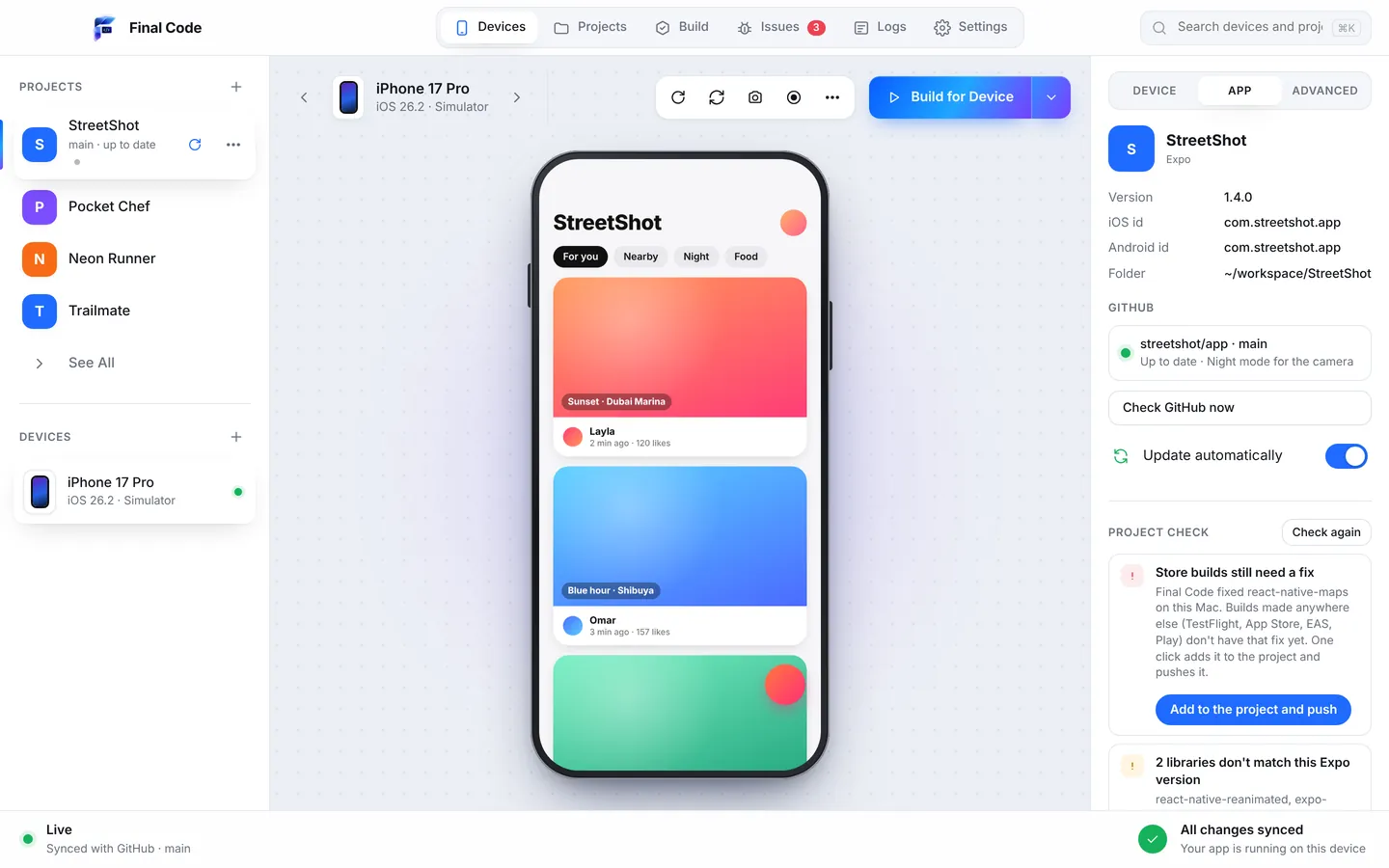
Final Code asks for a little more on day one, then much less after. You open your project folder or pick it from GitHub with "Open from GitHub". Final Code recognises Expo (managed, bare, with or without a development client, and with Expo Router) and works out how to build it. No config files to write. If something is missing on the Mac, such as Xcode components, CocoaPods, Java or an Android SDK, the Tools screen installs it in one click. Final Code finds what you already have and installs the rest.
The first native build takes a few minutes. After that, Final Code reuses it and only rebuilds when native code or libraries change, so day two feels as quick as Expo Go.
Speed once you are working
Both tools give you Fast Refresh: save a file and the screen updates. The difference is how many screens. In Final Code, every open simulator and emulator updates at once, so an iPhone, an iPad and an Android phone all react to the same change and you flip between them. Nobody has to pick up a phone and rescan.
Final Code also keeps a shared download cache for every project and a compiler cache for native builds, so switching between projects does not mean downloading the same things again.
Real devices vs simulated behaviour
Expo Go runs on real phones, which is great. But because it is a host app, the phone is not running your app as users will. Your bundle identifier, your push setup and your sign-in redirect all belong to Expo Go during that session.
On real phones, Final Code installs a real release build with your code inside. It is a bit like TestFlight, only straight from your Mac. If a library uses a React Native API that was removed in your version, you find out now, because that kind of problem often only crashes in release builds. Project check looks for exactly this, along with libraries that do not match your Expo version and missing babel plugins.
Development builds vs release builds
Expo Go is purely for development. A development build from Expo is your own version of that idea, with your native code, and you can create one in the cloud with EAS Build or locally. Both are good.
Final Code covers both sides locally. Simulators and emulators get the live, reloading experience you know from Expo Go. Real phones get release builds, and Build history keeps every one with its commit, date and size, so you can put last Tuesday's build back on a phone in one click and see whether a bug was already there.
Debugging and crash reports
In Expo Go, a JavaScript error shows a red screen while you develop, and you can open the usual React Native developer tools. That covers a lot.
Final Code adds the parts that are harder to see. Every error, crash, failed build and setup problem becomes one issue per project in the Issues box, with how often it happened, on which device, the stack and the log lines just before. Issues close themselves when new code runs for 3 minutes without them, and reopen if they come back. On real phones, each launch gets a session log with the JavaScript console, the phone's native output and crash reports with readable function names. When a sign-in fails because a provider is switched off in Supabase or Firebase is not set up, Final Code says so and links the right dashboard.
Working with AI coding tools
Lots of Expo apps are now written with help from Claude, ChatGPT, Cursor or Copilot. Expo Go shows you the result, but the AI cannot see it. Final Code writes a .finalcode folder into the project with live status, logs, issues and screenshots, and the assistant can ask Final Code to build, reload, tap, type and take screenshots. It can check its own work on a real device. If the AI pushes to GitHub, Final Code pulls the new commit within a minute and every open device reloads. Read more on building apps with AI.
Price
Expo Go is free, and for learning it is hard to beat free. Final Code costs $29 a month or $249 a year, with a 14-day trial started in the app and no card needed. A membership covers up to 3 Macs. Full details are on the pricing page. If you only ever build small Expo experiments, you may never need to pay for anything, and that is fine.
Privacy
With Expo Go, your JavaScript is served from your own computer to your phone on your network. With Final Code, everything is built on your Mac and your code never leaves it. The app has no analytics. Both are private by default for everyday development.
Who should use which
- Students and first-time builders: start with Expo Go. Move when a tutorial says "this needs a development build".
- Indie developers shipping to the stores: Final Code, so you test the real app on both platforms every day.
- Agencies with many client projects: Final Code, because each project's SDK version and native libraries just work, and switching is one click.
- Windows or Linux users: Expo Go and EAS Build, since Final Code is Mac only.
Using Expo Go and Final Code together
Keep Expo Go on your phone for quick experiments and snack-sized demos. Open the same project in Final Code when you add a native library or want to check every screen size. When you ship through EAS or the stores, Final Code's "Store builds need a fix" button copies any library fix it made on your Mac into your project with patch-package and pushes it, so your cloud builds behave like your local ones. There is more on this workflow on our Expo page and React Native page.
Is there an alternative to Expo Go that supports custom native modules?
Yes. Expo recommends a development build, which is your own app with your own native code. Final Code builds and runs that for you on a Mac without terminal commands: simulators and emulators get live reload, and real iPhones and Android phones get release builds with your code inside. Any native library your project uses works, not only the ones bundled with Expo Go.
Why does my app work in Expo Go but crash in the release build?
Expo Go runs your JavaScript inside its own app, so release-only problems stay hidden. Common causes are React Native APIs removed in your version, libraries that do not match the Expo SDK, or missing babel plugins. Final Code's project check looks for these when a project opens, and real phones get real release builds, so you see the crash before your users do.
Why won't my older Expo project open in Expo Go?
According to Expo's upgrade guide, Expo Go only supports the latest SDK version, so a project on an older SDK will not open in the current Expo Go. You can upgrade the project, or build it as your own app. Final Code builds the SDK version your project uses and flags libraries that do not match it.
Can I test push notifications without Expo Go?
Yes, and on Android you have to: remote push notifications from expo-notifications were removed from Expo Go, and Expo points you to a development build. Final Code installs your own app with your own identifier on real phones, which is what push services expect. Simulators and emulators still update live while you work on the rest of the app.
Do I need an Apple developer account to use Final Code instead of Expo Go?
For iOS Simulators and Android devices, Final Code works with what is on your Mac. To install on a real iPhone, Final Code signs the app for you using an App Store Connect API key or the Apple account already in Xcode. Expo Go needs no account at all, which is one of its real strengths for beginners.
Can I see my Expo app on iPhone and Android ?
With Expo Go you scan the QR code on each phone separately. Final Code shows iOS Simulators, Android Emulators and real phones in one window, and every open simulator and emulator updates together when you save. You can rotate, switch to dark mode, enlarge text or go offline per device from the inspector.
Does Final Code work with Expo Router and EAS?
Yes. Final Code detects managed and bare Expo projects, with or without a development client, and works with Expo Router. It does not replace EAS for store builds. When Final Code patches a library locally, one button adds the same fix to your project and pushes it, so EAS, TestFlight and Play builds get it too.
Is Expo Go good enough for a production app?
Expo Go is a development tool, not a way to ship. Expo itself suggests moving to a development build for real-world apps because it is closer to production. Many developers keep Expo Go for experiments and use a tool like Final Code to test the real app daily on simulators, emulators and real phones.
Ready to run the real app?
Open your Expo project in Final Code and see it on every device. Free for 14 days.
Product names are trademarks of their owners. Comparison based on publicly available information as of October 2026.